ISO is one of the three pillars of photography (the other two being shutter speed and aperture), and it has a major effect on your images. How does camera ISO affect your images? In this article, we will introduce ISO for beginners and explain how to use it effectively for the best possible results.
Table of Contents
What is ISO?
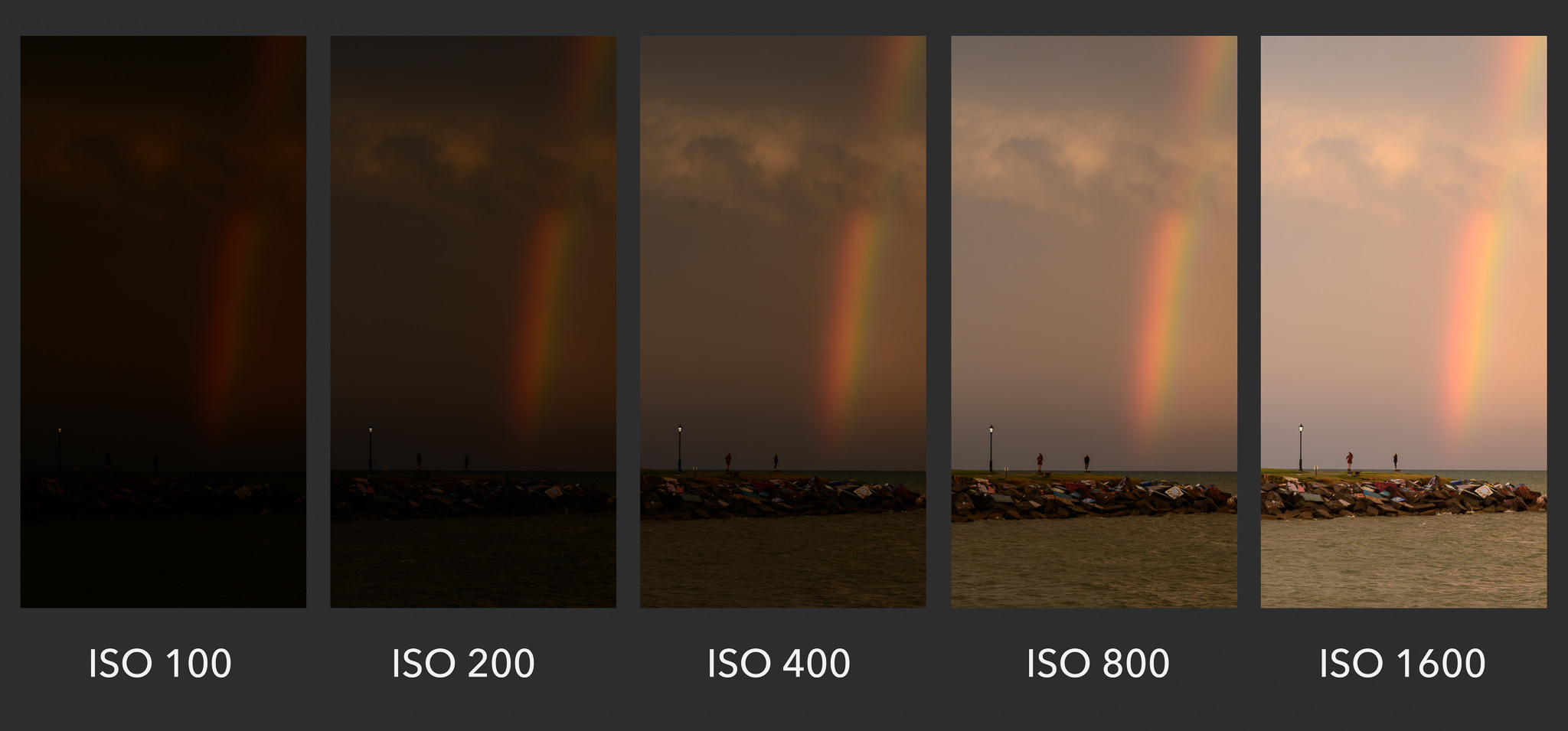
In very basic terms, ISO is simply a camera setting that will brighten or darken a photo. As you increase your ISO number, your photos will grow progressively brighter. For that reason, ISO can help you capture images in darker environments, or be more flexible about your aperture and shutter speed settings.
However, raising your ISO has consequences. A photo taken at too high of an ISO will show a lot of grain, also known as noise, and might not be usable. So, brightening a photo via ISO is always a trade-off. You should only raise your ISO when you are unable to brighten the photo via shutter speed or aperture instead (for example, if using a longer shutter speed would cause your subject to be blurry).
What is the Meaning of ISO?
The acronym ISO stands for “International Organization for Standardization”. However, camera ISO does not directly refer to the organization that creates various technology and product standards. Ever since two film standards called ASA and DIN were combined into ISO standards in 1974 (later revised for both film and digital photography), they were referred to as one word “ISO” from that point on. Although ISO initially defined only film sensitivity, it was later adopted by digital camera manufacturers with the purpose of maintaining similar brightness levels as film.
Common ISO Values
Every camera has a different range of ISO values (sometimes called ISO speeds) that you can use. A common set is as follows:
- ISO 100 (low ISO)
- ISO 200
- ISO 400
- ISO 800
- ISO 1600
- ISO 3200
- ISO 6400 (high ISO)
Quite simply, when you double your ISO speed, you are doubling the brightness of the photo. So, a photo at ISO 400 will be twice brighter than ISO 200, which will be twice brighter than ISO 100.
What is Base ISO?
The lowest native ISO on your camera is your “base ISO”. This is a very important setting, because it gives you the potential to produce the highest image quality, minimizing the visibility of noise as much as possible. Some older DSLRs and a number of modern cameras, such as the Fuji X-T2 have a base ISO of 200, whereas most modern digital cameras have a base ISO of 100. Optimally, you should always try to stick to the base ISO to get the highest image quality. However, it is not always possible to do so, especially when working in low-light conditions.
Side note:
Some cameras have extended “HI” and “LO” values for ISO that might stretch beyond their native range. However, these are completely simulated and lower your image quality. We recommend avoiding them.
Low vs High ISO Noise Visibility
To give an example of two photos taken at different ISO values, take a look at the comparison below. Pay attention to the level of noise (graininess and blotchy colors) in the images:
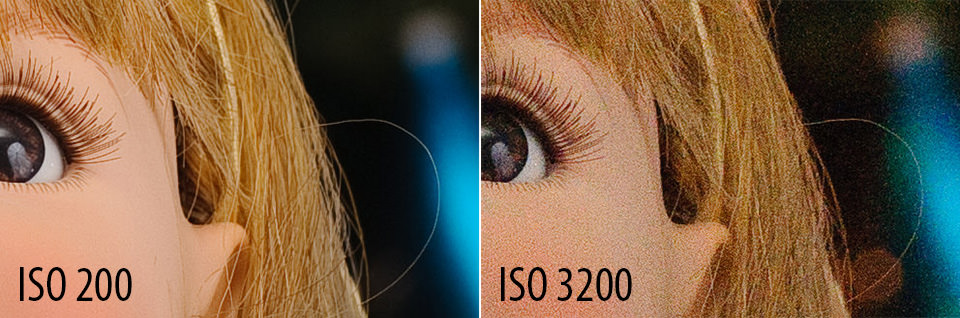
The difference is clear – the image at ISO 3200 has much more noise than the one at ISO 200 (which I brightened with a long shutter speed instead). This is why you should avoid high ISOs whenever possible, unless conditions require you to use them.
How to Change ISO
Changing ISO varies from camera to camera. Here are some common ways to change ISO:
- To start, enter a mode that lets you select the ISO yourself. Get out of Auto mode, and go to Manual, Shutter Priority, Aperture Priority, or Program (we tend to prefer Aperture Priority or Manual).
- For entry-level DSLRs and mirrorless cameras, you probably need to open a menu (possibly the “quick menu”) and find the section for ISO. Select the value you want, or set it to Auto.
- For higher-end cameras, there may be a dedicated “ISO” button on the camera. Press it while spinning one of the wheels to change your ISO setting. If you don’t see a button labeled “ISO”, it is still possible that your camera will let you program one to perform this task.
- Other cameras may have a dedicated wheel that already has various ISO settings marked. This makes things even easier.
Check your camera manual if you still aren’t sure. However, it is worth being very familiar with how to change your ISO setting quickly, since it’s something you will likely be adjusting quite often, especially if you shoot in low light conditions without a tripod or flash.
What Camera ISO Should You Use?
Many photographers understand the basics of ISO, but they aren’t sure which ISO value to actually pick in the field. In practice, there’s a reason why your camera allows such a wide range of ISO settings: Different situations call for different ISOs. Below, we will cover some of the common scenarios you may come across.
When to Use Low ISO
As discussed above, you should always try to stick to the lowest ISO (base ISO) of your camera, which is typically ISO 100 or 200, whenever you can. If there is plenty of light, you are free to use a low ISO and minimize the appearance of noise as much as possible.
Even in dim or dark environments, you still might be able to use a low ISO. For example, if you have your camera mounted on a tripod or sitting completely still on a table. In that case, you can safely use a low ISO and brighten your photo via a long shutter speed instead, since you won’t introduce camera shake. However, keep in mind that if your camera does use a long shutter speed, anything that is moving will look like a ghost:
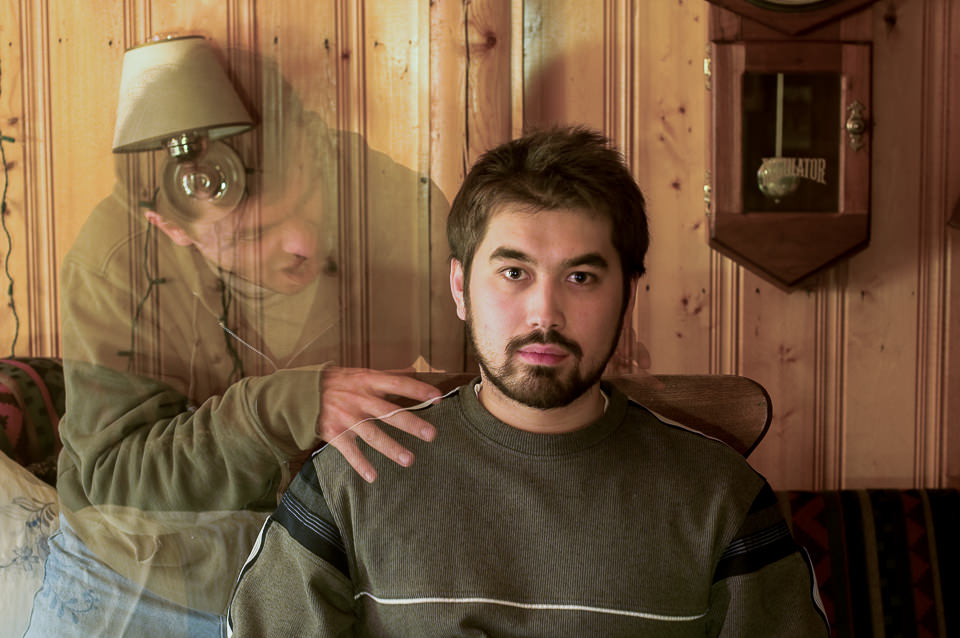
Just kidding, of course! That’s my lovely nephew being the subject of my long exposure test. I set the camera to the lowest ISO to retain the detail, which required a long shutter speed of five seconds in order to capture a bright enough photo. My nephew sat still, while my friend stepped in for a brief moment to introduce the ghost.
When to Use High ISO
Even though it is ideal to use low ISOs, there will be plenty of times when a high ISO is necessary in order to take a good photo in the first place. The simple reason is that you are often fighting against motion blur, and you will need to pick between a sharp photo at a high ISO, or a blurry photo at a low ISO. Take a look at the image below:
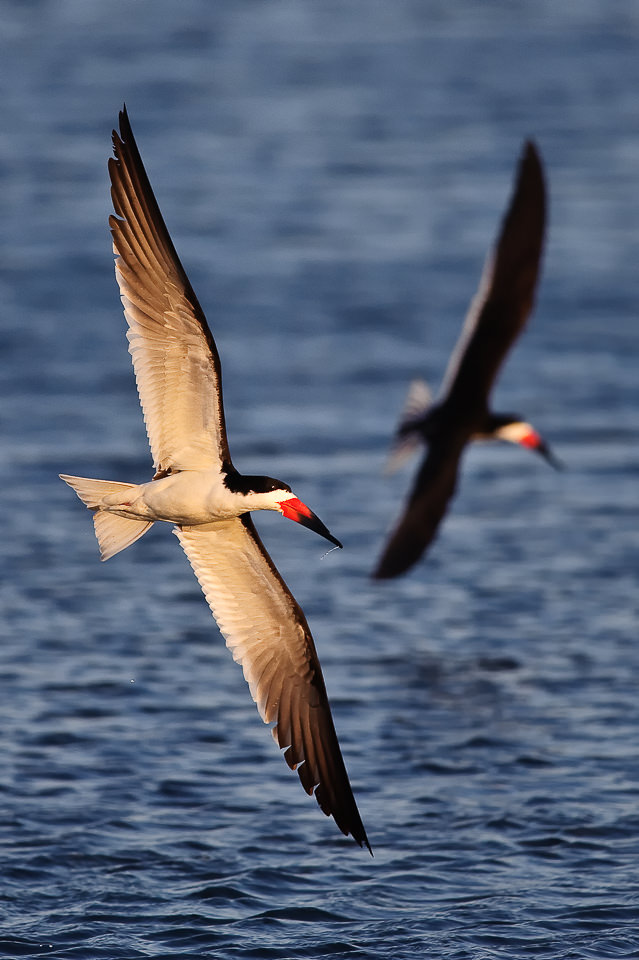
I captured these Black Skimmers at 1/2000th of a second and ISO 800. Here, my camera needed 1/2000th of a second to fully freeze the birds while they were in flight. What would have happened if I had set ISO 100 on my camera instead? I would have needed a shutter speed of 1/250th of a second to capture a bright photo. At that setting, there would have been a lot of unwanted motion blur in the picture, since the birds were moving so fast. In short, I would have ruined the picture.
The bottom line is that you should increase the ISO when there is not enough light for the camera to capture a sharp, bright photo any other way. When I shoot handheld photos indoors without a flash, I always set my ISO to a higher number to capture the moment without introducing blur. Or, when photographing ultra-fast action like in the bird picture above, raising your ISO is often necessary.
On most cameras, there is a setting for Auto ISO, which works great in low-light environments. The beauty of this setting is that you input the maximum ISO you are willing to use, so that the camera does not cross that limit. Personally, if I want to limit the amount of noise in a photo, I will set my maximum ISO to something like ISO 800, 1600, or 3200. The downside is that the camera will start using progressively longer shutter speeds if it reaches these ISO limits, which leads to more motion blur. Everything is a trade-off!
Minimizing Noise and Maximizing Image Quality
Some photographers think that the best way to capture high-quality images is to use Base ISO 100% of the time. However, as demonstrated above, that simply is not true. Sometimes, you’ll be in dark environments when you have no choice but to use a higher ISO.
You should only use base ISO when there is enough light to do so. Don’t try to force ISO 100 in a dark environment, or your photos will come out way too dark. Similarly, if you’re using a fast shutter speed to capture action, it’s essentially the same as taking pictures in a dark environment (since you strictly limit the amount of time your camera sensor is able to capture light). So, for certain types of sports and action photography, a high ISO might be your only option.
To maximize your image quality, here are the four steps you need to follow:
- Select the aperture setting that will provide your desired depth of field.
- Set your ISO to its base value, and put your shutter speed to whatever setting provides a proper exposure.
- If your subject is blurry, progressively raise your ISO and use a faster shutter speed until motion blur disappears.
- If your ISO is getting too high and you still have the ability to use a wider aperture, open it up until the ISO gets to a more manageable level, even if it means sacrificing some of your desired depth of field.
That’s all it takes! If you follow these steps, you’ll capture the maximum image quality each time. You’ll find the ideal balance between noise, motion blur, and depth of field.
Common ISO Myths and Misconceptions
ISO has a lot of myths surrounding it, including some that are quite common to hear. In this section, we will quickly address some of those concerns so that you are not misled about this topic in the future.
This is the most common myth related to ISO. It is something you will see all over the web (and in print). However, although it may help you to think of ISO as “acting like” camera sensor sensitivity, that’s not what it actually does. Instead, digital sensors only have a single sensitivity, regardless of your ISO. It is more accurate to say that ISO is like a mapping to tell your camera how bright the output photo should be, given a particular input exposure.
No, ISO is not part of exposure. Shutter Speed and Aperture brighten your photo by physically capturing more light. ISO doesn’t do that; instead, it essentially brightens the photo you already captured. So, photographers don’t consider it to be a component of exposure.
This is a clever question, but, again, it is simply a misconception. Brightening a photo on your computer can act in many ways like raising your ISO, since it does make noise more visible (and it leads to a brighter image). But the simple difference is that raising your ISO in the camera nearly always provides better image quality than brightening a photo on your computer. In other words, it is better to use ISO 800 when necessary, rather than brightening an ISO 100 photo to a huge degree in post-processing software like Lightroom!
ISO increases or decreases the brightness of a photograph, but also affects both grain / noise levels and dynamic range. At the lowest (base) ISO setting, your images will have the least amount of noise and the highest dynamic range, giving you the most flexibility in post-processing. As ISO is increased, noise levels increase and dynamic range typically decreases as well.
When shooting in low-light conditions, your shutter speed will typically decrease, resulting in camera shake or motion blur. To avoid such issues, you should increase ISO setting to a higher value, such as ISO 1600. Depending on your aperture and light conditions, you might need to increase ISO even more.
When photographing landscapes, you should use a tripod and set your ISO to your camera’s base ISO, which is typically 100.
Conclusion
If you have any questions, comments or feedback, please post them in the comments section below.

Very informative articles for an amateur like myself. In words I can understand too, lol. Thank you!
Very helpful
I want to join your team
I have looked many places for a layman’s explanation of ISO and never really found it. This was exactly what I was looking for to gain an understanding of how ISO, shutter and aperture all work together to create a good photo. I hate having to just use auto mode on an SLR because I don’t know what I’m doing. This article was a HUGE step towards being able to select the vaunted “M” and USE my camera. Thank you!
I just discovered this website and decided to look up what you said about ISO. I find this is one of the most misunderstood concepts in photography and very often outlines misconceptions as if they are facts. So, it’s a good way to find out if the website knows what they’re talking about, and this was spot on. The only thing I would add is that high ISO doesn’t add noise, it just reveals noise that is already in the captured image.
It’s the very difficult concept that most people try to oversimplify, but this article does a great job of explaining it without oversimplifying by saying things like ISO changes the sensitivity of the sensor, which this explains well is not the case.
I understand your request for simpler language. ISO, in the context of photography, refers to the sensitivity of the camera’s image sensor to light. It determines how bright or dark your photos will appear, especially in low-light conditions.
When you adjust the ISO setting on your camera, you’re essentially telling it how sensitive you want the sensor to be. Higher ISO values make the sensor more sensitive to light, allowing you to capture brighter images in dimly lit environments. Conversely, lower ISO values make the sensor less sensitive, resulting in darker images but with less noise or graininess.
To clarify, ISO does not directly affect the live image seen through the camera’s viewfinder. It influences the exposure and brightness of the final captured image, but the live view remains unaffected by ISO changes.
“ISO, in the context of photography, refers to the sensitivity of the camera’s image sensor to light.”
No, it doesn’t. Nasim explicitly said that’s not the case and explained the sensor only has one sensitivity.
In the four steps mentioned, I do not see the relation between ISO and a blurred image in step 3. After the first two steps, I would use a faster shutter speed to reduce or eliminate blur and then only increase the aperture and sacrifice depth of field and only as a last resort increase the ISO bearing in mind that doing so also increases noise.
What an amazing free class that is enabling me to know my camera so well and learn at a fast rate! No photography background but everything is explained so clearly. Will recommend to all newbies! Thank you so much and God Bless ✨️
Again, Thank you very much 🙏👍
I’ve just discovered your excellent site and it is extremely accessible and clear so thank you for the effort the team have put in to its production.
As an electronic engineer I believe that higher ISO settings result from higher amplification (gain) of the tiny signals from the sensor. Whenever you amplify a signal you also amplify the sensor noise caused by thermal and semiconductor shot noise. Thus at higher ISOs you will see artefacts due to noise. This is why cameras designed for astrophotography have cooling devices built in to lower the temperature of the sensor therefore reducing the thermal noise enabling higher ISO settings to be used with less noise.
Don’t forget photon noise, which is mainly shot noise in the visible spectrum.
Signal-to-noise ratio = √ (expected number of photons)
en.m.wikipedia.org/wiki/Shot_noise
The electronic noise you mentioned increases with exposure duration, hence the benefit of cooling sensors that are used for long exposures.
Well one question remains: Why is it, that rasing ISO in-camera (almost instantly with only a small processor) produces better results than making the picture brighter later on the computer with all it’s hi-tech software and offline processing power?
This suggests that there must be more to it, than simply brightening the image after the shot, doesn’t it?
ISO is not dependent on processing power, originally it was a physical property of film rolls used in mechanical cameras that had no electronics at all. So if you wanted to take a photo with an ISO of 100 you’d use a roll that is graded as 100, if you wanted 1600 there were rolls for that too.
I’m not a technical expert on this matter but in my understanding ISO is applied to the live image that the camera sees in the moment. If the lighting conditions of the environment are poor it’s harder to see the finer details but they’re still there and high ISO can bring them out as long as it deals with the actual real view. But once the image has been taken a computer can no longer see the details that were lost to the darkness, the picture is set in stone and it severely limits how much you can improve the brightness on it as opposed to determining it with ISO while your camera is still there on the spot, shooting the picture in real time.
I tested it on my Nikon Z5, and brightening an underexposed ISO100 image looks the same as ISO1600. But some cameras have a clever dual readout which makes it better to use a certain step in the camera,