How to Take Sharp Photos

One of the things that makes photography frustrating, is softness and blur in pictures. Sharp photos are much more appealing than soft images. It is very disappointing when you take a picture at a special moment and images come out soft/blurry or out of focus. In this article, I will go through the techniques that I use to make sure that my images always come out tack sharp.

Let’s start with the reasons why an image might come out blurry:

  1. Slow shutter speed could cause camera shake, which would produce a blurry image
  2. Poor focus acquisition would result in a soft image
  3. Your subject could be moving and causing a motion blur
  4. You might have a bad lens or a lens that is not capable of producing sharp photos
  5. Your ISO could be set to a very high number, resulting in lots of noise and loss of detail
How to take sharp photos

Sharp Photo

In order to resolve these issues, you need to address them all at the same time, which will help achieve optimal sharpness.

How to take sharp pictures

  1. Start with setting your camera to the lowest ISO “base” value (in my Nikon camera it is ISO 200). Remember that the camera base ISO will produce the highest quality images with maximum sharpness. The higher the ISO (sensor sensitivity), the more noise you will see in the image. I suggest reading my article on understanding ISO.
  2. If you have an “Auto-ISO” feature in your camera, set it to “On” with the following settings: ISO sensitivity auto control: “On”, Maximum sensitivity: 1600, Minimum shutter speed: 1/100. What this does, it basically tells the camera to automatically change the sensitivity of the sensor based on light availability. If the amount of light entering the lens decreases and the shutter speed goes below 1/100 of a second, the camera automatically increases ISO to keep the shutter speed above 1/100 of a second. If you have shaky hands, I would recommend bumping up the “Minimum shutter speed” to something like 1/200-1/250 (I will go through proper camera hand-holding techniques so that you could shoot at even lower shutter speeds in a separate article). If you do not have Auto-ISO, then you would have to adjust it manually in low-light between the lowest value and ISO 1600. Why ISO 1600 is the maximum I recommend? Because anything higher than that in an entry-level DSLRs produces too much noise, which has a negative impact on overall image quality. On older-generation DSLRs such as Nikon D40/D80/D200, you might want to keep the maximum ISO to 800.
  3. Hand-holding rule: If you have a zoom lens that goes beyond 100mm, I would recommend applying the general hand-holding “rule”, which states that the shutter speed should be equivalent to the distance in mm of the lens. For example, if you have your lens zoomed at 150mm, your shutter should be at least 1/150 of a second. Keep in mind that this rule applied to old 35mm film cameras, so if you own an entry-level DSLR with a crop factor (not full frame), you need to do the math accordingly. For Nikon cameras with a 1.5x crop factor, just multiply the result by 1.5, whereas for Canon cameras, multiply by 1.6. If you have a zoom lens such as the 18-55mm (for Nikon DX sensors), set the “Minimum Shutter Speed” to the longest focal range of the lens (135mm), which is 1/200 of a second. Here are some examples:
    • 50mm on Nikon DX (D3000/D5000/D90): 1/75 (50mm x 1.5)
    • 100mm on Nikon DX (D3000/D5000/D90): 1/150 (100mm x 1.5)
    • 150mm on Nikon DX (D3000/D5000/D90): 1/225 (150mm x 1.5)
    • 200mm on Nikon DX (D3000/D5000/D90): 1/300 (200mm x 1.5)
    • 300mm on Nikon DX (D3000/D5000/D90): 1/450 (300mm x 1.5)
  4. Flower with a bee

    Flower

  5. 99% of the time, I shoot in Aperture-Priority mode and set aperture to the lowest value when I shoot in low light. In aperture-priority mode, you tell the camera what the lens aperture should be (the “f” number, for example f/3.5), while the camera automatically meters and guesses what the shutter speed should be to properly expose the image. So, set your camera to aperture-priority mode and lower the aperture to the lowest possible number.
  6. Set your metering to “Matrix” on Nikon or “Evaluative” on Canon, so that the whole scene is assessed to estimate the correct shutter speed.
  7. After you set the right metering mode and your lens to aperture priority, point it to the subject that you want to photograph and half-press the shutter. Doing so should show you the shutter speed on the bottom of the viewfinder. If the shutter speed is showing 1/100 or more, you should be good to go. Snap an image or two and see if you are getting any blur in your image. I typically review my images on the back of the camera at 100% and make sure that nothing is blurry. If the shutter speed is below 1/100, it means that you simply do not have enough light. If you are indoors, opening up windows to let some light in or turning the lights on will help to increase your shutter speed.
  8. If you are still getting blurry images, try to hold the camera steady without shaking it too much and take another picture. If it doesn’t help, try increasing the “Minimum Shutter Speed” value to a higher number in your “Auto-ISO” settings. For those without the “Auto-ISO” feature – try to bump up your ISO all the way to ISO 800 or even 1600 and see if you can get faster shutter speeds.
  9. While hand-holding your camera, there is a direct correlation between the camera shutter speed and blurry images. The lower the shutter speed (below 1/250 of a second), the blurrier the images. Why? Because while hand-holding a camera, factors such as your stance, breathing, camera hand-holding technique all play a huge role in stabilizing the camera and producing shake-free images. Think of it as holding a rifle on your hand. You wouldn’t want to move around while trying to shoot – you need to stand as steady and stable as possible, pull the stock tightly into the shoulder, exhale and then shoot. The same technique works great for your photography, especially when you have to deal with slow shutter speeds. As I said above, I will post another “how-to” on proper camera hand-holding techniques, but for now, I recommend holding the camera just like you would hold a rifle (except your right hand goes on the shutter instead of the trigger), with one of your legs on the front and your body balance spread across both legs. I personally exhale when I shoot very slow shutter speeds and it does help me to get sharper images, so try it and see how it works for you. The difference between shooting a camera versus a rifle, is that you can at least adjust the shutter speed to a higher number and avoid camera shake, whereas you cannot do the same on a gun.
  10. Learn how to focus correctly and deal with focusing issues. This one is very important, as your camera focus directly impacts image sharpness. The first thing you need to learn is how to differentiate between a camera shake/motion blur and a focus problem. When a subject in your image is soft or out of focus, while something else in the foreground or background is perfectly in focus and sharp, it is a focus issue. If the whole image is blurry and nothing is sharp, it is most likely a slow shutter speed or improper camera holding technique that is the issue. If you are having problems acquiring a good focus, here are some things that I recommend for you:
    • Lack of light can cause auto-focus malfunction, resulting in inaccurate focus acquisition by the camera. Make sure there is plenty of light for your camera to properly focus.
    • The center focus point is generally the most accurate in cameras. If you are having problems acquiring focus because your focus point is elsewhere, I recommend moving it back to the center. Many cameras allow having a separate button for focusing, without touching the shutter. I set my camera this way, focusing exclusively with my thumb, while pushing the shutter trigger with my index finger. This way, I can use the center focus point (which almost never has any issues with acquiring correct focus), acquire correct focus, then recompose without moving my body and then shoot. If you have such a feature in your camera, I recommend enabling it in low-light situations. In all other cases, leaving the shutter to both focus and shoot is the best option for convenience reasons.
    • The camera auto-focus system works by looking at the contrast around the focus area. For example, if you try to focus your camera on a clean white wall, it will never be able to acquire focus, because the camera will not see any areas of contrast. On the other hand, if you have a white wall with a dark object on it and you put your focus point in between the wall and the object, your camera will instantly acquire correct focus. My recommendation is to place the rectangular focus area to an area with the most contrast. Examples are: edges of objects, lines separating different colors, numbers and letters printed on objects, etc.
    • Focus multiple times until you can clearly see in the viewfinder that the object is in focus. For this one, you need to have a good viewfinder and a good vision. Some entry-level DSLRs have a very small viewfinder, making it hard or sometimes even impossible to see if you are getting correct focus. Unfortunately, there is not much you can do if you cannot tell if the subject is in focus by looking into the viewfinder, so just take multiple pictures while constantly re-adjusting the focus and review images on the camera LCD.
  11. Make your subject freeze. If you are photographing a person, have them freeze and not move while you take their picture. When you work with slow shutter speeds, even if you do everything right, your images might still come out blurry just because your subject moved while the shutter was open. This is called motion blur. Sometimes people like the effect of the motion blur, especially for high-speed objects like cars. To reproduce this effect on your camera, set your camera to Shutter-Priority mode, then set your shutter to 1/100 of a second or less. Ask your subject to move his/her hand quickly, while not moving the body. The result should be a sharp picture of the person’s body, while having a motion blur on his/her hand.

  12. An example of motion blur

    As you can see from the above image, everything in the image is sharp, while the fan is blurred through motion blur, that I specifically created by shooting the image in low shutter speed of 1/20 of a second (the image was shot hand-held).

    Here is another example of motion blur that I shot at night on a tripod (shutter speed is 2 seconds):

    Another example of motion blur

  13. Make sure that your vibration reduction (VR on Nikon) or image stabilization (IS on Canon) is set to “On” on your lens, if you have it. Many of the consumer zoom lenses have some sort of anti-shake/vibration reduction technology in them, allowing one to shoot at lower shutter speeds and still get sharp images. If you have one of those lenses, go ahead and try lowering your shutter speed to a lower value. You can even lower down the “minimum shutter speed” in your Auto ISO settings to something like 1/50 of a second and still get sharp images.
  14. Get a good fast prime lens such as the Nikon 35mm f/1.8 DX or 50mm f/1.4 / f/1.8 lenses. These prime lenses are relatively inexpensive, ranging between $100 to $400 for the f/1.4 model. Very few zoom lenses can achieve the same optical quality as the prime lenses, because prime lenses have simpler design and are optimized to perform for only one focal range. Although you lose the ability to zoom in and out, prime lenses are much faster than most zoom lenses and are excellent choices for low-light and portrait photography. Because of the shallow depth of field, they are also capable of producing pictures with beautiful bokeh (nicely blurred backgrounds). When I got my hands on my first prime lens, I just could not believe how much of a difference it made in terms of sharpness. If you have never used a prime lens before, give it a try and you will not regret it.
  15. When photographing people or animals, always focus on the closest eye to you. This is very important, especially when dealing with large apertures between f/1.4 and f/2.8. As long as the eye of the subject is sharp, the image will most likely be acceptable. Take a look at this photograph of my son Osman:

    Bad focus example

    Normally, I delete images like this, but I’m glad I kept it for this article. As you can see from the above image, I failed to acquire correct focus on Osman’s eye and somehow focused on his hair instead.

    Now, compare it to this image:

    Good focus example

    Such a big difference between the two. The second image looks much sharper, although I was using the same camera settings.

  16. Aperture also plays a big role in achieving optimal sharpness. For landscape photography, I mostly use apertures between f/8 and f/10, while for portraits, I use apertures of f/1.4 to f/8, depending on what I want to do with the background. Most lenses are sharpest between f/5.6 and f/8, so if you are shooting during a bright sunny day, try increasing your aperture to a number between f/4 and f/8 and see if it makes a difference. Just keep in mind that playing with aperture changes the depth of field and will have an impact on the lens bokeh.
  17. Clean your lenses! An amateur photographer approached me once and asked for advice on what he could do to bring more contrast and sharpness to his images. When I saw the front element of his lens, I immediately made a suggestion to clean his lens. It was so dirty that I couldn’t believe he was still able to take pictures. A dirty and a greasy front element of the lens is a guarantee to inaccurate camera focusing and poor image contrast. I will soon post a quick “how-to” for lens cleaning, but for now just go to a local camera store and ask for a good lens cleaning solution along with microfiber cloth. Put a drop or two of the solution on the microfiber cloth and gently wipe the front of the lens element starting from the center of the lens to the edges, in clockwise movements. Do it multiple times until the front element looks very clean.
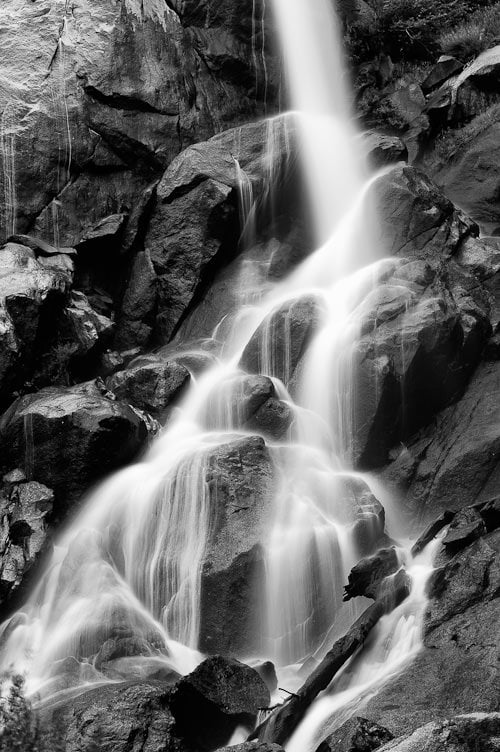
  18. Get a tripod for low-light situations. For shooting lightning storms, fireworks, city lights and other cool stuff at night, a sturdy tripod is a must! Don’t buy a cheap tripod designed for point and shoot cameras, but rather invest in a heavy duty, sturdy tripod that can handle your DSLR. Having a self-timer mode or a cable/wireless shutter release is also very helpful, to minimize camera shake. The below image would not be possible to capture without a tripod:

    Waterfall, shot with a tripod

    Waterfall, shot with a tripod

  19. Shoot in bursts. Set your camera to AF-C (Auto Focus in Continuous Mode), then photograph your subject in bursts by just holding the shutter button. Shooting moving subjects continuously (especially children) helps improve the odds that you’ll get a shot that is spot-on. Firing off 3 or 5 shot bursts can also help freeze the motion of your subject, especially when with a bit of panning. Sometimes you’ll get just enough of the face (of say a happily-running kid) in focus then everything else gets blurred because of the motion, leaving you with a nice isolation that highlights the emotion of that moment. This valuable tip was provided by our reader Eric.

I hope you liked this article on how to take sharp photographs with your DSLR camera. Please let me know if you have any questions in the comments section below.


No related posts.

About Nasim Mansurov

is a professional photographer based out of Denver, Colorado. He is the author and founder of The Mansurovs, along with a number of other online resources. Read more about Nasim here.

Comments

  1. 1
    ) Randi

    this was wonderful, thanks for all the help :]

    • 2
      ) MegaZ

      Randi, you are most welcome! Please let me know if you have any questions.

      • 149
        ) Lindy

        Question: Do you know what I need to set my Nikon on so that if I want to blow a picture up really large it will not be low resolution. Like for example, if I am ordering pics online and try to order a picture to even a 16×20 it pops up a warning that this pictures resolution is too low. I would appreciate your help. please email me at lindybrooke26@yahoo.com
        Lindy – low resolution problem

        • 160
          ) Jennifer Barksdale

          Hello,

          I am having the exact same problem as Lindy. Can you please e-mail me at irenesimages@live.com with a solution on how to fix this problem when ordering large prints? I use a Nikon D5000 camera. Thank you!

      • 179
        ) Nouman Aslam

        Nasim Mansurov, i am a new user to dslr cameras and got “NIKON D5100″. I haven’t tried your steps yet but the sound good. Actualy i want to take picture like usulay we see in professional shoots of models etc…are these steps enough to do so,or…..??? Plz help if u can.
        Thanks in advance…

    • 59
      ) Anne

      I followed your recommendations for the Auto ISO and shot on A mode. However, I’m still getting blurry pictures. Well, the background isn’t blurry but the person (subject) is. What am I doing wrong? Also, you can’t adjust shutter mode while shooting in A mode so what would you recommend when this happens?

      • 60
        ) Nasim Mansurov

        Anne, seems like I did miss your comment, because it was on the top. If background is not blurry, but the person is, your focus is not on the correct subject.

        Do you know how to get correct focus on your subject?

  2. 3
    ) Mukhsim Ra

    Nasim, that's a very informative tutorial, thanks a lot for sharing it!

  3. Hi Nasim thanks for the valuable information.

  4. 7
    ) Donald

    Thanks for the great article. I came back from holiday having taken lots of photos only to be disappointed to see they mostly lacked the sharpness i hoped for. Thanks for the insight. Very helpful.

    • 8
      ) Nasim Mansurov

      Donald, are you using a DSLR or a point and shoot? Can you try the above instructions and settings and see whether the sharpness improves?

      Also, some lenses have a “backfocus” problem – it is when you focus the lens, it focuses either in the back of the subject, or in the front, but not on the subject itself. If you cannot get any sharp photos on your camera, you might need to look into the focusing issues on the camera and lens.

      • 9
        ) Donald

        “Unfortunately” its a point and shoot camera – the Canon SX200 IS. I think it may have been a “backfocus” issue with my wildlife holiday. Most photos looked rather soft. I have seen sample images on the internet taken with the same photo and they are very sharp, so not sure why I dont produce the same. I doubt its a camera issue though. I used to get really sharp images with my older Sony Cybershot P&S camera. Your articles here are providing priceless insight into photography basics. Thanks

        • 10
          ) Nasim Mansurov

          Donald, the SX200 IS is a superb camera! It supports all camera modes, including my favorite aperture priority and full manual modes. Having image stabilization also helps a lot, especially in low-light situations.

          Bear in mind though that in low-light situations, most cameras (including DSLR) have a hard time focusing, especially on moving objects.

        • 13
          ) Myron

          I own a Nikon D80 and rely on the auto features. When shooting daylight photos even at 100 ISO using auto and a Nikon 28mm 2.8 lense some of my photos always come out bright an overexposed. Can you provide any solutions for this. When I used program on my old Nikon 2020 camera and used program photos always came out perfect program on the D80 does not produce correct exposures. Also your website is very helpul and appreciated thank you Myron.

          • 14
            ) Nasim Mansurov

            Myron, can you check what metering you have set on your camera? The metering is a button located on the bottom left of your shutter. Press that button and make sure that it is not set to a single dot – it needs to be set to a dot surrounded by four squares.

            Basically, metering controls how your camera evaluates light. If you have your camera set to “spot” metering (dot), then what happens is that if the subject is dark compared to everything around, the camera will try to expose the subject correctly, while blowing out everything else.

            Another thing to check for is exposure compensation. It is the other button close to the metering button. Press and hold it and make sure that the display shows “0″.

            Hope this helps.

  5. 11
    ) Amat

    Your tips very helpful

    thanks..

  6. 15
    ) Myron

    Thanks for your advice on using exposure compensation and checking to see if my camera is set to matrix metering. I am using a Nikon D80 and my daylight pictures come out too bright when I use the Auto Mode You explained exposure compensation but this does not work in Auto Mode could you please explain how to use the Program mode it seems that you can select aperature in this mode. I ‘d like to use it with flash both indoors and outdoors thank you. Myron.

    • 16
      ) Nasim Mansurov

      You are welcome! If you already have your camera set to matrix metering, then, you should definitely check out your exposure compensation. If your D80 does not let you adjust exposure compensation in Auto Mode, then I recommend shooting in a different camera mode. If you really want to stay with an automatic mode, try “Program Mode” instead. Program Mode is very similar to Auto and it will also pick the combination of shutter speed and aperture for you.

      While in Program Mode, you can press the exposure compensation button and see what it is currently set to. The camera default setting is “0″. One thing that I remember was a problem in my Nikon D80 before, was that it always overexposed images by about half a stop. If your exposure compensation is 0, change it to -0.7 and try it out – you should get more accurate exposure after this change. The new Nikon D90 and all other cameras do not have this problem, although I prefer to leave my exposure compensation at -0.3 on the Nikon D300 and D700 as well.

      As far as Program Mode, when you switch to it, you can change the shutter speed and exposure by simply rotating the rear dial. If you rotate it to the right, the aperture will decrease and shutter speed will increase, while rotating it to the left will decrease the shutter speed and increase the aperture instead.

      I personally never use Program Mode and prefer to use Aperture Priority, because it gives me more control over lens aperture.

      I highly recommend to read my Understanding Digital Camera Modes article that I wrote a few weeks ago – I explain what each mode does in detail there.

      Hope this helps.

  7. In my Nikkon D 5000 i tried in shooting men Auto-ISO” feature in your camera, set it to “On” , this i did but i canot do ISO sensitivity auto control: “On”, when i try then it says , this operation is not available in the creent setting.

  8. 20
    ) Robert Gomes (Canada)

    “WOW!” is all I have to say after taking a look at your website. And you have kids too! Where on earth do you find the time?

  9. Hi Nasim,

    Very informative site!!! I have two cameras, a Nikon D200 and a Nikon D300. I can’t seem to get very sharp images like I get on my strictly digital Nikon 8800 which I use for my website. I’m using an autofocus Nikon lens that is 75-300mm (I think) and can’t believe I’ve spent so much money to get the lousy shots I seem to keep getting. Enlarging the photos beyond 11×17 produces nothing but “noisy” images. I’ve “reset” the camera by pressing both the green reset buttons at the same time, but for whatever reason the photos are too dark or not in focus. I’ve been told to buy an F2.8 lens, but don’t want to spend a fortune if I’m not going to get nice SHARP photos. I do get a FEW nice shots every now and then (get lucky maybe??), but not very often for the money nor quality Nikon is known for………….. HELP!!!
    Thanks in advance. karl

    • 23
      ) Nasim Mansurov

      Karl, can you send me an example shot to take a look and see what might be the problem? Your DSLR photographs should always be better than point and shoot, unless you are doing something wrong.

      Are you comfortable with using your DSLR cameras? Do you know how to control ISO, Shutter Speed and Aperture?

  10. 24
    ) Eric

    Wonderful article =)

    Just wanted to share a technique I read from another site/blog quite some time ago about increasing your chances for ‘keepers’. Using the ‘Continuous’ or ‘burst’ mode when shooting moving subjects (especially children) helps improve the odds that you’ll get a shot that is spot-on. Firing off 3- or 5-shot bursts can also help freeze the motion of your subject, especially when with a bit of panning. Sometimes you’ll get just enough of the face (of say a happily-running kid) in focus then everything else gets blurred because of the motion, leaving you with a nice isolation that highlights the emotion of that moment =)

    (And in this digital age, a few more shots are relatively free, right?)

    • 25
      ) Nasim Mansurov

      Eric, what a great tip, I completely forgot about shooting in burst! :)

      Thanks for contributing, I added your suggestion to the article!

  11. 26
    ) Raynolds

    i using the nikon D3000 model DSLR camera, my lens is f3.5-f5.6 with length 18mm-55mm (kit lens), now the question is, is there any difference if i using f2.8 with focus length 70mm-300mm when we consider the sharpness of the picture?

    i understand when we using smaller aperture is shooting we will get the clear background and when i using bigger aperture the foreground is more clear and the background will blur.

    another question is, if i want to upgrade my lens, what aperture i go for? f/2.8, is this lens can make my picture more sharp and clear depending with the f/3.5 lens?

    • 27
      ) Nasim Mansurov

      Raynolds, yes, the larger the aperture (or smaller f number), the softer the background will appear in your pictures. If you have a really long lens above 100mm, you can stand closer to the subject and make your background look very smooth. The softness of the background also depends on the subject distance, so try to stand closer to your subjects to obtain the maximum bokeh.

      What specifically are you trying to achieve by upgrading your lens? Sharper images? Softer backgrounds? Let me know.

      • 30
        ) Raynolds

        I’m using the D3000 Nikon DSLR, only 10 megapixel, if i want to shoot the wildlife like (birds, animals) and i would like the foreground and background sharper and clear, what lens should i upgrade or i need a higher camera set?

  12. 28
    ) John

    Hi, I am also using a D3000 and have started to get more involved in portrait photography. I’ve been using the kit lens for a while and after some other reading decided that a fixed lens might help me achieve better bokeh and make the sharpness of the subjects a little better. The most bang for the book that I’ve found is the Nikon Nikkor 50mm f/1.8 AF; for only about $140 it is right up my financial alley. Do you think this would be a good starting point for stepping up in portrait photography? Most of it is official functions like dinners, promotion ceremonies, and other places where I can get pretty close to the subjects.

    On another subject, shooting moving objects like cars and sports whats a good start for that? I end up usually using shutter priority and it ends up taking a while for me to find the right shutter speeds, do you have any good “starting points” like you do for when you shoot “99% in aperture priority?”

    • 29
      ) Nasim Mansurov

      John, do not buy the Nikon 50mm f/1.8 – it will not autofocus on your Nikon D3000. I would recommend the Nikon 35mm f/1.8G instead…

      In terms of moving objects, it all depends on the amount of ambient light. When you set your shutter speed in shutter priority mode, pay attention to the camera meter inside your viewfinder – it will be a good indicator of what your shutter speed should be. If the image is heavily underexposed, the meter will be on the minus side.

      Hope this helps.

  13. 31
    ) belthur

    Awesome tutorial…really learned a lot…

    another tip from my own personal experience on my D90…stay away from the 11 point 3D tracking until you very comfortable with you camera…I just stick to single point focus ….

  14. 33
    ) Martin Huynh

    Very nice tutorial …
    i’m not photograph, but i like to go out to take a picture :)
    i use Canon 7D, i got it on my birthday :) with 18-200mm og macro 150mm-F/2.8 sometime, i cant get a sharp image, i dont know why …
    sorry, my english is very poor :)

    • 35
      ) Nasim Mansurov

      Martin, thank you!

      That’s a nice birthday present! As far as getting sharp images, are you saying that you have not captured a single sharp photo with your camera? If that’s the case, then there could be something wrong with it…

      If you can’t get sharp photos occasionally, then it is nothing to worry about – you just need to learn how to use your camera and in what lighting situations. I would recommend to read photography books and go out and shoot more and you will certainly learn a lot.

  15. 34
    ) farid

    hello nasim, a’kum w.t.w
    I’ve my d3000 set like what u recommended in your post….. as a results I get more faster shutter speeds…. means more convenient for me to take pictures that before which I set it at manual setting to fix to iso 100…. the things that bothered me was… the quality of the pictures…. seems that most of my pictures now auto set to hi iso…. the pictures looks breaking up compare to my last picture set to iso 100… the question is, how can i get a a very good picture’s quality using the auto setting..?….. tq bro…

    • 36
      ) Nasim Mansurov

      Farid, are you saying that after you turned on Auto ISO your images all seem to be very grainy/noisy? If yes, what is the maximum ISO that you set on your camera? If you are not comfortable with too much noise, just decrease the maximum ISO to a smaller number and you will see less grain. The only problem is, as you lower your ISO, your shutter speed will also drop and it might drop to a low level where you will introduce camera shake to your images.

      Hope this helps.

  16. 37
    ) farid

    Yup…. Sorry…. The correct words are grainy/noisy…. When I shoot in a low light environment most of my pics turn to iso 1600 which I set for the max iso in my setting… currently I set the max iso to 800 and I haven tried to used it in diff. environment… maybe later I can tell you the result I get… btw… no hush for the late response…. Thank you for your advices… I’ll keep it in mine…

    • 38
      ) Nasim Mansurov

      Farid, did lowering down ISO to 800 help in getting better results? If you are getting too much blur due to slow shutter speeds, it might be best to get a flash or a faster lens…

  17. 39
    ) James

    Hi Nasim, nice informative info for us aspiring photographers, I like the fact you actually answer people unlike so many out there, well done.
    I recently bought a D90 after having a Canon 450D (rebel) and its a superb camera, however, main thing I want is crystal sharp images and the Canon 450D and basic lenses were ok but I want WOW if you know what I mean? what Lens would you recommend as tack sharp bearing in mind my main pics are my family and landscape? I’m looking to have one lens all the time.
    Thanks

    • 40
      ) Nasim Mansurov

      James, sorry for a late response! Although I do respond to comments, sometimes it takes me a while to catch up :)

      In terms of your D90, what lens did you purchase it with? Or is it a body-only?

      It is hard to find just one lens that “does it all”, because there are different kinds of lenses for different needs. For example, a portrait lens will make your subject sharp, while blurring the background, while a wide-angle lens will make everything look sharp for landscape photography, architecture and other needs.

      Let me know what lens you have now and we’ll go from there.

  18. 41
    ) James

    np Nasim, I bought the 16-85 which has quite good reviews, just got it so reserving judgement, basically I was hoping to get something similar in focal lenght but super sharp like the canon L lenses, I dont mind not having great reach as I grew up with film and primes and my feet were the zoom. Thanks for any advice.

    • 43
      ) Nasim Mansurov

      James, I apologize for a late response, been super busy lately. I have not used the 16-85 yet, but I do have it now and I will be performing some serious tests with it within the next few weeks and will eventually write a review on it, so stay tuned :)

      The 16-85 is a very good focal length on the D90 both on short and long side, so I am sure you will enjoy it!

  19. 42
    ) James

    Nasim, you must be busy ;)
    what do you think of the Nikon 35mm f/2D and also the newer 35mm f/1.8DX? for use on my crop body D90?

    • 44
      ) Nasim Mansurov

      If you are looking for a good 35mm lens for the D90, get the Nikon 35mm f/1.8G DX instead of the f/2D – it is faster, sharper, lighter and cheaper.

      • 180
        ) Maria

        Hi Nasim,

        I want to find out would 35 mm f/1.8 for D5000 or would you recommend another one sharp portrat pictures. I have one lense 18-55 (kit) and 18-200 f/4-5.6. I am also looking for suggestion for wide angle lense (not a fish eye) that I would like to use for landscaping, interior design, high rise Manhattan buildings and artistic look of the beach or couple on the beach with clouds in the unusual dimension. I was looking for 10-24 from Nikon or sigma 10-20or tokina 11-16 f/2.8.

  20. 45
    ) Kay_Lopez

    HI! I just bought a new nikon d90 and I’m a newbie in DSLR thing, just love taking pictures that’s why I bought one.
    I’m just wondering,in my view finder I noticed there’s a little rectangular black image in the upper left when I look into my view finder when focusing an image. But it does’t show when photos are taken already. I just want to know if it is suppose to do that?
    thanks and hoping you can help me out..

    • 46
      ) Nasim Mansurov

      Kay, nothing to worry about – it just means that you have a dust element on your DSLR mirror. If it bothers you a lot, you can simply blow it off from your mirror using Giotto’s Rocket Blower after you take the lens out. But be careful, as you might introduce dust into your sensor, which is much harder to get rid of…

  21. 47
    ) James

    Nasim, I’ve bought the 35mm f1.8 as you suggested and its very sharp thanks. What do you think of the 60mm f2.8 AF-S Micro as a good family/portrait/general lens as its 90mm on my D90?
    Lastly I’d like to use a prime for landscapes as a zoom will make me lazy, what do you recommend thats sharp and good colors etc etc?

    • 49
      ) Nasim Mansurov

      James, what is your budget for the landscape prime? As far as a good family portrait lens, why can’t you use the 35mm? Is your idea to get better bokeh?

  22. 48
    ) Kay_Lopez

    Thanks Nasim…keep up the good work..

  23. 51
    ) Jodi

    Thanks for the wonderful information. I just got the Nikon D5000 and a Tamron 10-24mm lens to shoot real estate photos. I’m using this with a Promaster 7400edf speedlight. I’m having a terrible time getting sharp interior photos. I need everything in the room to be in sharp focus, so I’ve been setting the aperture at f22, but then the shutter speed drops down to nothing and the photos are still dark. To get an image that is bright enough, I have to set the ISO to 3200, which I’m sure is what’s causing the noise, but I don’t know how to fix this and get images that are both bright enough and sharp. Do you have any tips?

    • 54
      ) Nasim Mansurov

      Jodi, I would not recommend to set the aperture to f/22 – your images will suffer from diffraction (which basically degrades image quality). Just stand a little further away from the closest subjects, then use apertures between f/10 and f/13 to get the most depth of field. If you shoot at 10mm, you might not need to move too far back.

      If you are getting dark images at f/22, it means that the interior is pretty dark. Your exposure stops by default at 30 seconds, which is the maximum amount of time the camera will expose for when shooting without a cable release (in aperture priority, shutter priority, auto or manual). So, try lower aperture and stand further away from the closest object then try again. If your exposure is again 30 seconds, you can get a cheap infrared cable release and use shutter speeds longer than 30 seconds.

      Hope this helps.

      • 55
        ) Jodi

        Thank you so much, Nasim, for your advice. I have only had the camera a few days and I’m just starting to get things figured out (obviously). I reshot the photos at f10 amd f13, with the ISO on auto. The camera chose shutter speed 1/60 and ISO 1600 (I set that ISO as the limit, as you suggest above). Both new photos are a little sharper, but there is still a lot of softness. I already have the camera on a tripod, so I will probably try using the timer next to see if camera shake is part of the issue. I was also thinking of taking back the Tamron lens and exchanging it for the Tokina 11-16mm, f/2.8 to see if that would help since low light seems to be a major issue here. If you have any additional thoughts, please let me know, otherwise, thank you so much for your help and expert advice.

  24. 52
    ) David McConnell

    Dear sir
    I have learned so much reading your articles and I thank you for sharing. I asked this question before and didnt get a reply. I hope it isnt one where the pros are snickering and laughing at mt me.I got a D3000 this christmas with the 18-55 lens. for all around use what lens would be my next move up lens.PS: I need to stay less than the price of the kit if possable.also what is DX-FX. I found a 70-300 I think it was, For like $349is that moving up or moving over?. Thankyou so much for helping us newbes
    thanks David M

    • 53
      ) Nasim Mansurov

      David, I am very sorry if I missed your comment or email, sometimes it just happens due to volume :)

      In terms of your next lens, what are you planning to shoot? If you need a good portrait/general lens, then I would suggest the Nikon 35mm f/1.8G – it is a great little lens and it is one of the cheapest Nikon lenses out there. If you need the reach for wildlife and other purposes, the Nikon 70-300mm you looked at is not bad, but I believe has no VR at that price. I would definitely get the VR version of the 70-300mm lens…

      Hope this helps, let me know if you have any questions.

      • 57
        ) David McConnell

        Thank you Mr.Nisam, I have learned so much from you even when you answer others questions.Idont know why butI tried that 70-300 in the dept. store and it looked very very dimI left there and went to a all camera shop and tried a zoom lens not the same exactly but the same lens but the mag. and speed were close. looking back I think the 70-300may have had a protectant or static cover over the glass. I know from telescopes that the more you mag. the darker the image is. just the nature of the beast.
        I do have one more questionif I may.i have seen the mirror type that have no adjustment there eather 300- 400-500I think I woult use itas a little weaker than going prime focus on my scope its at 2055mm @f10 or simply using my scope as my lens.
        . Sir if you wouldnt mind answering 1 more question. some times when im tryimh to get a picture of like the milkyway .Iand it wont fire says not enough light. sometimes it will. am I missing another setting that would stop that and actuate every time thank you for your time so very much

        David.

        • 62
          ) Nasim Mansurov

          David, are you talking about mirror lenses? Those should be fine for astrophotography…
          In terms of “not enough light”, just put your camera in manual mode and shoot in manual instead. That way, you should not get any errors.

  25. 56
    ) Ojo

    This has to be one of the most in depth articles I’ve ever read!
    Thank you so much for sharing your knowledge and expertise. I will be putting into practice lot of the topics you touched on.
    Once again, thank you.

  26. 58
    ) Casey

    This is an amazing article, I have not read an article on photography with such depth of information. Thank you for taking the time out of your valuable schedule to inform everyone on the internet about photography. Greatly appreciated.

    Few questions:
    I have always shot in Av or aperture priority with F1.8 and it is producing very soft edges for my portraits. Now I want to shoot my subjects in a very sharp, crisp look. I have been told that changing the F-stop to f4.5 – f5 will do so, any ideas on what are good settings to make my shots less soft and more sharp edges.
    Your reply will be greatly appreciated! =]

    Also, most of the time I will be shooting outdoors with great natural sunlight. ISO @ 100 or 200 will be no problem.

    Thanks again!

    • 64
      ) Nasim Mansurov

      Thank you for your feedback Casey!

      In terms of shooting sharper portraits, try bumping up the aperture to f/2.8 or even f/4.0 and see how you like the results. You will have a little less blur on the background, but your subjects should be tack sharp!

  27. 61
    ) viviane

    hi, i’ve a nikon d5000. Tried taking night scenary with a tripod but most of the pictures turned out to be out of focus and colour not right, I’m using the m mode, smallest shutter speed 1 second n aperture at f3/5. Would really appreciate if u could tell me what went wrong. tx

    • 65
      ) Nasim Mansurov

      Viviane, it is always difficult to focus with a camera at night, simply because there is not enough light for camera to use. The color changes are most likely due to White Balance – I would try to change it manually next time, or you can shoot in RAW mode without having to worry about WB.

  28. Nasim,
    It’s a wonderful article.It is really very commendable how you have penned down the instructions step-by-step and how you have replied to each of the comments.
    I am just a beginner and started photography wih my Nikon D5000.Your site is really very helpful.
    Thank you again!

  29. 67
    ) Lenard

    Thanks for the great and useful tips :) … I find it hard to get sharper images on my dslr lately.

  30. Hi, i am using a Nikon d5000, and i am trying to figure wether to buy the 18-135mm lens or rather proceed to 18-200mm since i am taking potraits shoot more…any suggestions?.. And also i have a speedlight sb600, what do i need so that i can use it as a off camera flash?..
    Your opinion and suggestions will be much appreciate… thanks!!

    • 72
      ) Nasim Mansurov

      Gonzalas, I would personally go with the 18-135 over 18-200mm and buy another smaller lens like 35mm f/1.8G.

      In terms of off-camera flash, you will need a flash commander, either the SU-800 unit or something like SB-800/SB-900.

  31. 73
    ) Mazlan

    Hi,

    Can I know how to get sharp picture with 4 to 6 person..
    For single person, you can focus on the eye…. how about 4 to 6 person, where do you focus to get sharp
    picture?

    Thx.

    • 77
      ) Nasim Mansurov

      Mazlan, when you photograph groups, try to put them on the same plain and then use a larger aperture like f/8.0.

  32. 74
    ) Billie

    This is a great article and I have read the comments. I also have a Nikon D3000 and just got a 70/300 mm lens. Most of the pictures are sharp and clear, but I am trying to take pictures of wildlife – ie birds in trees – some at a distance, and the pictures and not as sharp and clear as I want. I have adjusted the ISO but wondered what to adjust to get the pictures sharper?

    Thanks

    • 78
      ) Nasim Mansurov

      Billie, if your exposure and technique are right, then the softness is the result of your lens – you might need a better and sharper lens for those long shots.

  33. 75
    ) Tokunbo Egunjobi

    This absolutely fantastic 4 me.Infact it’s like a soothing relief.Thanks such much

  34. 76
    ) azanhk

    I just came back from shooting photos.
    But then, I found out few of my photos look blur.
    Two same pictures with same setting, position, angle, time (few seconds diff.) but the latter looks obvious blur. So frustrated I still dont know why its happening.

    Im using 500D with tamron fast lens 28-75/f2.8.
    ISO setting have been set to 100 before I started the shooting.
    Before this, like you, most of the time I use AV mode.
    But right now Im learning to use TV mode and keep the shutter at 1/60 to make sure enough light entering my lens as Im shooting in a jungle. Moreover, Im shooting still objects.

    Then I found this article and Im agree with all the suggestions. And some extra that I never know before. Thank you very much for the postings.

    I believe that, based on your article, camera shaking is the most troublesome and it is highly related to posture and grip technique during shooting.
    Looks simple but actually very important.

  35. 81
    ) Jan

    Nasim, thank you for the valuable article.

  36. 82
    ) cian marciano

    sir is it worth to invest for the yung nuo 467 flash for nikon or should i settle for the sb 600?

  37. 85
    ) Michael Zafra

    Spent 5 minutes reading and i think i’ll spend another hour reading your other posts.
    Thanks for the wonderful information you have here Nasim.
    It’s a great help for amateurs like me.

  38. 86
    ) DJJZ

    Nasim,
    WOW!
    Thank you so much for providing these helpful tips! I can truly say that they are the best tips I’ve ever read on-line and even How to… books! My pictures are a lot more “professional looking”. My friends and family are very impressed!
    J

  39. 87
    ) lindsey

    good day ,
    thank you for the amazing tips :)
    i have the nikon d90 how do you get that pictures so sharp , amazing ,
    pls give some info
    ps ,dont realy no anything about camaras lenses :(( thanks
    lindsey

  40. 88
    ) Cher

    Hi,
    I came accross this article while seeking ways to insure photos that are in focus. I am suer that my first session with the swans this week wsa ruined dur to camera shake but I cana;t use a tripod for the waterfowel. My next days shootings were entierly out of focus. Your hints have helped significantlay and I will learn how to seet my AF. I just got the Olympus E5 but also use the E1.
    I am sure my eyesight is going fast and I wonder if you have any hints on how to shoot when you have poor eye sight,> You did cocmment on this in your article. I thoguht I saw specialk diopter adjustment pcs somewhere but am not suer they exist. It may be my imagination but I thoguht Olympus had them on their site. I do nt see them today. :( I would be most appreciative3 if you have time to provide hints for those of us who are aging or have existing poor eye sight. I need three different prs of glasses, one for reading, one for tv and one for the pc. I don;t know what to do as far as photographing. I am primarily a nature photographer eg water folw but also am a macro photographer etc.
    I can’t affrod any lenses until I laern how to sell existing photos. I just won a macro photo contest at Hunt camera and video and was asked to do 4 portfolios of 25 photos eaq on their site. That is when my desktop crashed so that project is not completed but it should help with exposure of that kind. :)
    Thank you so much for your articles. I do not use Facebook or any of those but I will keep accessing your homepage for your written articles. Thank you so much.
    I did no tenter a website as do not know of a good one; I am definaetly in need of a web site to put my photos on that is very ecconomical if you have an article on that I would look forward to reading it.
    Cher Boston MA USA

    • 90
      ) Nasim Mansurov

      Cher,

      Diopter Adjustment is a simple feature that exists on most modern DSLRs, including your E5. Just use the diopter adjustment to correct for your vision and you should be able to see well.

      As for uploading images online, just use Flickr.com or Smugmug.com – they both work great for online galleries.

  41. 93
    ) Aqib

    hi, great article.
    1 question, though?
    why do we have different modes when same result is going to be acheived. i mean wether we use aperture mode or shutter mode if either way camera is going to get the same exposure then why do we even have these two modes? must be me only but honestly i have not understood the point of this, yet. maybe you can make me understand since you are good at it. thanks in advance

  42. 95
    ) DSLR Newbie

    Sir,
    I enjoyed reading ALL your articles under “Photography Tips For Beginners” because it’s written in plain, simple every-day English.
    You should seriously consider writing a book for us newbies :)

    Anyway, I was wondering if you could do a simple writeup on understanding Histograms, how to interpret it and effectively use of it to produce better exposed pics.

    Thank you again!

    • 97
      ) Nasim Mansurov

      DSLR Newbie, thank you for your feedback!

      Believe it or not, but I never use histograms and rarely look at them…if you are just starting, don’t waste your time with histograms and learn how to shoot instead :)

  43. 96
    ) DJ

    Hello…

    Great site!

    Can you recommend any good resources covering the D3 for beginners besides the eye straining manual ?

    How about one on one training or mentoring? Location Berthoud Colorado.

    I know the learning curve is wide but I’m looking to hit the fast track.

    DJ

    • 98
      ) Nasim Mansurov

      DJ, I apologize for a late response. I am thinking about putting together a free workshop sometime in March when it warms up. If you are interested, subscribe to my blog so that you don’t miss it.

  44. 99
    ) Jane Stevens

    Thank you for sharing your articles – I have enjoyed reading them.
    I have a Nikon D300 and have been asked to shoot some pottery photo’s for a local guild.
    I haven’t had the camera long and have a lot to learn.
    Do you have any suggestions?

  45. 101
    ) Viviane

    Hi, for nikon d5000 is it normal that pictures taken using auto mode will be under exposure n color tends to be more dull n dark? My brother is using d3000, his pictures r so much brighter n color more vibrant when used auto mode. That makes me wondering whether is my camera faulty. Tx

    • 102
      ) Nasim Mansurov

      Viviane, it is normal that colors are off in low-light conditions – this happens even with the most expensive cameras. Learn how to shoot with your D5000 in aperture priority mode and use exposure compensation when images come out dark.

  46. 103
    ) Viviane

    Hi, Tx for e reply. Currently I am using aperture mode. I’m Just curious to know why
    Is e auto mode pictures so much difference from d3000. Even when taken outdoor with sunlight e pictures are quite dark n color dull too. For pictures that are taken using dslr is it most of them we need to edit the color n exposure? As
    I noticed those pictures that are taken by other people using e same model camera are so much nicer I can only achieve the same effect if only I edit the pictures.
    As I’m new using dslr hope you don’t mind answering my questions.

  47. 104
    ) Alexandra

    WOW WOW WOW…im speechless! Im so glad i ran into this. You have answered more questions in this small article alone than all the books i’ve been carrying and hauling around recently. Very simple, and straight to the point. Just how i like it. Great job Nasim, much blessings to you and yours bc you have certainly blessed mine. : )

  48. 105
    ) Paul

    I am getting motion blur in my photos (mostly children). I use Aperture mode, have ISO between 200 – 400. What should i be doing in order to not to get this blur.

  49. 106
    ) noel

    thanks for the very helpful tips. just had a nikon d5000 and cant wait to apply your tips. hoping to hear from you more often.. good luck to you and more power…

  50. 107
    ) pallavi

    Hi ,
    I have a Nikon D 5000 with 18mm-55mm(f/3.5-5.6G) and 55mm-200 mm(f/4.0 -6.0 G ) lenses.
    Its been an year that i have been trying to practice photography but till date am unable to get a crisp /non blurry picture.
    When i take out a picture especially a portrait using one of my above lenses it comes out pretty simple.
    it doesn’t look that they have been taken out using such a good lens. My pics seems to come out as though it has been taken out from a 50$ camera and not from such a high end lens. I feel I am not doing justice with my lens.
    IS there a problem with my lens or the way that I am shooting.
    Most of my problem is with the focus. i use a tripod most of the time but end up getting a blurry or a lost focus kinda photographs.
    Please help !

  51. 108
    ) breezy

    Hi! Thanks for the useful information for a beginner like myself.

    I have one question. I own a Nikon D90 with a 55-200mm VR lens and I am trying to take indoor photographs. I know that it isn’t the best lens for indoor photographs, but I chose that over the kit lens. Is there any great lens you can recommend for low-light or indoor photography? I like to take pictures of my kids, pets and my husband and I. The 55-200mm VR isn’t working for me : / .

    Anything would be most appreciated!

    Thank you!!

  52. 109
    ) Farida

    i have fujifilm finepix s5000. when i take pics on m mode first it comes so dark and blury too. how can i handle this situation plz . i set iso 200 .

  53. 110
    ) Natz

    Hey,

    Thanks for the write up, I am new to photography. I am having a Nikon D40, how can I capture a picture like the waterfall, where the water is flowing like effect. Any points on that will help me out :)

    • 112
      ) Richard

      Hi Natz.

      If you have TV mode on your camera then use that, otherwise it will be best to enter BULB mode on your camera, set a slow shutter speed of a few seconds, use a wireless/cable remote, tripod, and shoot just before the sun sets or sun rise. Otherwise you will have to buy ND Filters.

      Google “Long exposure photography”

  54. 111
    ) Richard

    Hi

    Great tutorials/tips. I have a challenge, which is the following.

    In shooting a person carrying a shoulder bag (shot from the side), how can you create an image where the person is blurred as if walking, and the keep the bag on their shoulder in focus?

    Your replies appreciated.

  55. 113
    ) Mukamo

    Hi Nasim,

    Your site is GREAT! I enjoyed reading all the articles and learned a lot as newbie. This is the best site I have seen and most of my queries are answered. Thanks for sharing your knowledge and experience and hoping more tips to come.

  56. 114
    ) Sai Tan

    Hi Nasim,
    As a newbie, i salute you for created such a wonderful site for people like me to pick up the basic photograhic knowledges and tips so easily . Thank you for being a wonderful teacher…
    question : taking landscape which lens serve better, AF -S 18-55 mm VR or AF 50mm f/1.8D.? Thanks in advance.

  57. 115
    ) Ivan Sinigaglia

    Thanks, helps me a lot. Cleared me many questions. (Brazil)

  58. 116
    ) Demetri

    Does Olympus SP800 ZU Digital camera 50 ISO setting in good lighting , with tripod give the best
    sharpest image over most cameras , when their lowest setting is 80 ISO ?

  59. 117
    ) Rainbow Ann

    Hi Nasim, great job! Thanks I came across this website.

    Sorry, but I have too many questions to make. I have a Nikon D5000 with 18-55mm lens. Photography has been always my real passion the reason why I bought this cam. But the thing is, I think I never yet learned how to take pretty sharp pictures. I always ended up with soft and underexposed or overexposed photos.

    In Aperture Mode, the smallest number it could get is only at F5.6 for Aperture. I cannot lower it further. In Shutter Speed Mode, I cannot increase the Shutter Speed more than 1/200. Why is that???? Is that only what Nikon D5000 can offer?

    I am more into landscape and group portrait and portrait. Please give me special tips on how to get my subject sharp at both daylight and low light.

    I always use Direct Sunlight for WB. Am I choosing the WB? And I always set the D-Lighting to Auto. Is that correct sir??

    THANK YOU SO MUCH!!!!!

  60. 118
    ) Rajesh

    Hi Nasim,
    That was enlightening. I guess i am a much better photographer now. By the way i use a Nikon D90 with a Nikor 50mm f/1.8 prime. It is interesting to know how you focussed on your son’s eyes and got a better picture. But my question is how to focus on a subject’s eyes? I do a bit of portrait photography and i do get clear sharp pictures. But i dont make any extra effort to focus on my subject’s eyes. I guess i got lucky with all my snaps. But i would love to know how to focus on the eyes of the subject so that i know what i am doing. By the way i use the Af-A. Should i select face priority mode? Please throw some light on this.

  61. 119
    ) matt

    wow! tq 4 the info..please feel pleasure to be your trainee…i’m own a d90 but mostly blind bout the functions..please helpme sifu,huhuhu

  62. The best article about sharpness and focus I’ve ever read.
    God Bless you my friend.

  63. 121
    ) Mazdak Akmurzayev

    Hello! Great articles!

    I have 35mm nikkor af-s, but have been reading that 50mm one is much better. But something I want to understand is 50 mm is narrower than 35, so to shoot faces-shoulders of 2-3 people standing[or sitting] together you have to be at least 2 meters away, and further you are from the object less sharper the image is, ist it? but with 35 mm you can stand closer[closer you are to the object, better the image sharpness], am I right?
    Or Simply, If you capture the same are with 35 and 50mm lenses[standing closer and further respectively], then which image will be sharper?

    The other question I have is did you retouch photo of Osman the sweety or waterfall?

    Cant wait to get the reply.
    regards
    mazdak

  64. 122
    ) Bryan Karl

    Very helpful article. I took down notes while reading everything.

    I’m using a 50mm lens on my Canon and sometimes I envy the pictures on the Internet which are really sharp. Does the type of lens also matter? Like what lens can outrun the 50mm when it comes to sharpness? Or does it not matter at all?

    Thanks a lot.

  65. 123
    ) Sairam

    I have a question regarding extension tubes.

    I find that when I attach extension tubes to my lens, the Depth Of Field becomes very shallow and even the object Im trying to focus on is blurred except for a few parts.

    1) I can’t change my aperture size
    2) Manual Focusing doesn’t solve the problem too much

    How do I still get up close to the subject like in Macro Photography, but get sharper focus on the subject?

    • 125
      ) Ajit

      I would rather advice do not use tubes, move closer to the subject or use Macro lens, it is meant for Macro photography. There is no other alternative for better photographs. However you can still get lucky and get one or two good pictures sheer out of luck because there are so many factors play a role when you use tube for Macro photography

  66. 124
    ) Astrid

    Hi! Thanks fot the information! I am 13 years old, i have a Nikon D60 camera with 18-55mm linces, and 18-270mm. I love to take pictures, but i dont feel like i have a real portrait lens. I takes portrait pictures of dogs all the time! But.. I wanna by me a new lens, for portrait.. something to recommend?

    - I have taken pictures in 3 years now, and I live in norway if you noticed my bad English.

    Astrid :)

  67. 127
    ) Dhruv

    Great article. I really learnt a LOT! Thanks :)

  68. 128
    ) Demetri

    I think ISO 50 setting w/ digital camera with a tripod in good lighting and required screens
    will give you the sharpest picture, if you can find a camera with 50 ISO setting.
    Also 35 mm Film camera shot with 100 ASA Provia slide film, can’t be beat with any digital camera You just have to know what your doing.

    • 130
      ) Charles

      NASIM

      What don’t you answer my question
      Charles

      • Charles, I did not see your question?

      • 138
        ) CHARLES DEMETRI

        LOOK AT DEMETRI QUESTION # 128
        THANKS

        • Charles, I did not realize that it was a question – I thought it was more of a statement. If you want my opinion, it all depends on the camera sensor. Sensors have the highest dynamic range and lowest amount of noise at their base ISO. Different cameras have different base ISO. Most companies have DSLRs with a base ISO of 100, while Nikon’s is at 200. It is not true that by finding a camera that has a base ISO of 50 that you will have the sharpest or highest quality image.

          Remember, digital sensors work completely differently than film cameras. There is no such thing as ISO in reality – it is just a number that manufacturers set in the past to make digital easier to transition to from film. Camera sensors do not change sensitivity like film does…

  69. 129
    ) Sana

    Hi Nasim,

    First of all thank you for the wonderful article! It was very informative, I loved it! :)

    I need your help! I own a Nikon D90, lens Nikon 35mm 1.8. There was a post by Anne-59, I have the same dilemma with blurry pictures and it’s driving me nuts! The background is in focus while the object is out of focus. I shoot in M mode, the lens is in AF mode. For eg. I had my camera on the tripod on self-timer, and of course the background was in focus while my face was out of focus. At times I get the same results through hand held. Could you please tell me what I’m doing wrong? Should I have my lens on M mode?

    I would really appreciate your feedback!

    Thank you,
    -Sana

    • Sana, in this case you have a focus problem and changing your camera mode is not going to affect the picture. You need to learn how to focus with your camera + lens properly. I have plenty of articles on Autofocus – check them out and see if you can get better at that.

      • 147
        ) Sana

        Hi Nasim,

        Thank you for your response. After doing more research I think I know what the problem was, there is a feature called-Mirror lock-up (often abbreviated to MLU) is a feature employed in many Single Lens Reflex (SLR) cameras. It allows the operator to reduce vibration-induced motion blur during exposure.

        In my case my Nikon D90 unfortunately does not have that option, however I do have Exposure Delay Mode-”In situations where the slightest camera movement can blur pictures, Exposure Delay Mode On can be selected to delay shutter release until about 1 second after the shutter release button is pressed and the mirror is raised”.

  70. 131
    ) stephen machua

    Thanks for your tutorial, great info. I find you speak much about the Nikon brand, i use a Canon 40D, It does well, i am planing to Upgrade soon. Thanks for helping us, it is true getting images sharp is crucial.

  71. 132
    ) Emily

    Could i send you directly a photo this evening and see if you can tell what is going on with my focus on my D300S with 24-70 mm lens?!

  72. This is excellent! Probably the best tutorial I’ve read yet… and I’ve been reading a ton since I’m just starting out. You are so precise. Thank you for taking the time to post so much detail!

  73. 140
    ) Demetri

    Please inform, what camera gives the sharpest image ?
    Please consider for film and digital set up ,can digital beat film 100 asa provia slide results ?
    I get many different opinions B/H Photo in NYC said Slides are best
    I assume you have to used both equal optimum set up and compare ?
    Every one has different eye values of judgments, that play a big part in the final judgments
    I Think this question would be very informative to many.
    Demetri

  74. 141
    ) Demetri

    Please inform, what camera gives the sharpest image ?
    Please consider for film and digital set up ,can digital beat film 100 asa provia slide results ?
    I get many different opinions B/H Photo in NYC said Slides are best
    I assume you have to used both equal optimum set up and compare ?
    Every one has different eye values of judgments, that play a big part in the final judgments
    I Think this question would be very informative to many.
    Demetri
    PS ” You didn’t answer before ?

  75. 143
    ) biswajit deb

    nazim….
    i have a canon 1100d…im plannin to buy a sigma 70 300 wid it coz im goin 4 a wildlife phottigraphy………i need sharp photos wid rich colours….what should be de settings……zoom nd normal nd portraits……..

  76. 144
    ) Rainbow Ann

    Hi Nasim,

    I notice, why are you ignoring some people’s questions while attending to others’??? My question is at No. 117. Can I have please an asnwer to it?

    Please take note to disregard the 3rd pharagraph question. It’s a mistake of mine.

    Thank you very much.

  77. 145
    ) Nitin

    Dear Nassim,
    Thanks for your input on camera technique. I’m amture photographer and bought Nikon L120. Motion pictures are very blurr. I did shoot in Auto and Auto Focus mode. As you said for motion picture ISO need to keep as low as possible, even though ISO-AUTO Mode is available.This camera sport continuous mode having only 3MP features which also seems to be very low quality.
    What is opinion on this product or can you guide me?
    Regards
    Nitin

  78. 146
    ) Ganesh Das

    Anyone can help me how to take a sharp picture from Nikon D5100 with 18-55MM. I have purchase this camera in Oct’11. and take atleast 500 picture but still i have not taken any sharp picture with this camera
    as shown in this site. Is there any other lense i have to purchase.
    Pl. help me or give some tips

  79. 148
    ) Scott Otis

    Hi Nasim:
    I thought at one point you had written an article of back/front focus and how to determine if that’s the actual problem. Did you write such an article? I’ve experienced a few issues with my D7000 and 50MM 1.8D lens. Anyway, i you have a procedure you like to use, please pass it along. Thanks…nice website by the way!

  80. 150
    ) Nina

    Hello, thank you for the tutorials,
    I have Nikon 200, and I occasionally take pictures of my family’s events, mostly in hotels, indoors, use external flash, But most of the photos comes out dark, so all time I have to sit down on the computer and use photoshop and one by one make them light, I use P, and I know I have to learn my camera , but I am scared. anyway each time i have to do hunreds of photos, mostly it seems , my flash is not enough and also photos are not sharp enough If i am not close to the subjets

  81. 151
    ) Sam

    Hey Nasim,

    Blog is EXCELLENT!!! Can you help me with this, I need to take some VERY GOOD snowboarding pics nect week. I have Nikon D3000 camera, need help with settings while shooting snowboarding pics.

    Thanks!

  82. 152
    ) Aja

    Thank you so much for this. I have been having such trouble with focus lately and your specificity on the subject will really improve my work. Thank you for taking the time to share… my life-long memories will always be indebted to you.

  83. 153
    ) vineet

    Very informative.

  84. 154
    ) Lavina

    Hello Nasim….
    I just found your website and found it very helpful. This is the problem I have.
    When I have a group of people 4 and above I have a hard time getting everyone focused.
    I always have a few of the people on the sides that end up slightly blurry.

  85. 155
    ) mallory

    Hi, I seem to get blurry/grainy pictures when there is too much light. Even when I have my subjects in the shade but the sun and/or sun bouncing off other surfaces causing my images to be bright. I try to adjust but my subjects still look washed out and grainy? Please help. Thanks

  86. 157
    ) mallory

    I always have it set at 200 iso with a low aperture and fairly fast shutter speed. Could it be my equipment? I have a d90 and mainly shoot with my 35mm. I’ve been following a lot of photographers and notice they all use D700 or higher (full frame) and have atleast the 1.4 versions of lenses if not better. All my lenses are 1.8s right now. I”m saving up for the d700 but dont want to be disappointed if there is a setting or something I’m doing wrong. I’m just frustrated bc my images aren’t as sharp as I know they can be. Any words of wisdom?

    • Mallory, there is absolutely nothing wrong with using f/1.8 lenses. In fact, some f/1.8 lenses like the Nikon 50mm f/1.8G are sharper and better than their f/1.4 counterparts in many ways. In 99% of cases, it is not the gear, but the photographer that is the problem :)

      D90 is a phenomenal camera and I have made many great pictures with it. In fact, Nikon D80 was my first DSLR.

  87. Hi Nasim

    I have started using Sigma 50mm f1.4 HSM EX DG lens with Canon 500D body recently. What I realize is that the AF at times acts funny and its not on the spot (like eyes,iris,edge of flower petals)or not producing a very sharp image even if I manually select the AF point. I would like to understand from you that from your experience,what would you recommend to get the focus right on a prime lens and get a very crisp shot.

  88. 161
    ) armene gallardo

    hello, i would to ask where can i see the page that you talked about your lens in wedding photography and some sample shots.. thanks

  89. 162
    ) Lloyd

    Hi Nasim, do you have any suggestion for D90 on the ISO sensitivity and active D lighting, Thanks

  90. 163
    ) JENNIFER

    Hi Nasim,

    I have had my Nikon D90 for about a year now. I am still not happy with the sharpness of the pictures. I went through your article and changed all of my settings. It did help, but I am wondering if it might be my lens. I have the manufactuers lens that the camera comes with as well as the 35mm 1.8G. I really want my pictures to pop. I do alot of outside pictures of families and children. Do you think that investing in a different lens might work. If so what lens would you recommend? Thanks for your expertise.

    Jennifer

  91. 164
    ) Poyan

    Hi
    I came across your website accidentally, while I was looking for some articles about how to take sharp pictures in low light. After reviewing your website I found it very interesting source information with great details and examples for each specific lens or camera. But what surprises me most that I couldn’t find any review about Nikon only mid-range zoom lens 17-55, F2.8 on your website!! I hope one day you review this great lens!
    Question: I have D90 camera with 50mm/f1.8D, and I am missing a good lens for taking pictures of children in low light condition. I have done lots of research and I even tried Tamron 17-50/ F2.8, but it was a disappointment. The lens was not fast enough and some compatibility issues with Nikon cameras in imo.
    I have read lots of good article about Nikon 17-55 and I was wondering if you suggest this lens for my needs (photography of moving objects in low light) ? I know that the price of the lens is HIGH ($1400), but what other options do I have? Thanks in advance for your replay.

  92. 165
    ) kris

    Thank you very much, I run a lot of marathons with my camera and (obviously) am out of breath whilst taking most shots. This has really helped me understand some ways to ensure I capture sharper photos. Will make lugging round my Canon G12 more worth while! K.

  93. 166
    ) Ankit Gupta

    Can you point the problem? I am standing just below the tube light in the room with enough brightness. Now I set my camera to Text(Macro) mode and I try to focus on the image. After some time I am able to obtain a correct focus but as soon as I click the taken picture turns out to be completely blurry. aaaaaah..

  94. 167
    ) John

    Hello Nasim,

    You suggested using the “separate” focus button to lock focus in low light situations, then recompose, rather than using the shutter button to lock focus. How is that any different than just pressing the shutter button half way to lock focus then recompose? Thanks you.

  95. 168
    ) Safana

    Hi.. can you please suggest me some general settings and lenses… i want to take sharp pictures at night ( both indoor and out door) without using the flash or auto settings.. i’m a beginner and using Canon EOS 1100D (i’ve 18 to 55mm lens and 75 to 300mm lens)
    also tell me how to take pictures of an event with all the lights and motions again without using my camera flash as it leaves some really dark shadows on the faces or leave them blank and over exposed..

  96. 169
    ) Promise

    Well am so happy about all these post. I have a Nikon D3000 and am enjoying my work with all the tutorials been applied on. Thankz to you all.

  97. 170
    ) lizzie

    thank you so much for very informative post regarding clarity..I did it and now most of my photos look good than before….thank you

  98. 171
    ) wochomi

    Thank you for such a wonderful article!

  99. Nasim,

    It was a pleasure finding your website I’ve made it a point to add it to my favorites.

    I have a website (www.Guerreisms.com) and am among one of the most popular street style websites. I focus on details (such as shoes, rings, pocket squares). I enjoy trying new things with the camera (Nikon D300s and the 50mm f1.4) I recently purchased the 80 – 200mm lens (f2.8). My problem is that I find the shots are very soft and blurry. I read this post but feel that I’m missing something, most likely my settings are off for detailed shots…but after reading all the reviews I was under the impression that if this lens was ideal for sports, I’d be able to use it with ease for catch people walking and/or simply standing stil. What do you suggest as to the correct setting for day time outdoors? Please send the response to guerreisms@gmail.com.

    Thank you in advance.

    Continued success with your site and all your endeavors.

    Guerre

  100. 173
    ) Melissa

    hi, I was wondering what I’m missing…I have a Nikon D80 and just got my first prime lens (50mm) which I love. I am having tremendous trouble with the focus if there is more than one subject, one is sharp and beautiful and the other is blurry? I have a great bokah effect but I want both people in focus. I shoot in either manual or aperture priority. Is there some basic thing I am missing? I love shooting with my 18-135 but I dont get nearly the bokah since I can only get to f5.6 with that lens.

  101. 174
    ) Sandi

    He there, glad I found your article to know that I’m not the only one having problems. My problem is the same as Melissa’s. When I take a shot with more than one person someone is always out of focus. How do I correct that problem? Is it simply raising my aperature to a higher number?

  102. 175
    ) Sally

    Hi, I dropped my Sony slt camera to concrete floor while it was power off. now, it can take pictures but the corners of every picture are blurred, the center looks fine. the pictures taken before the drop were perfect. The len looks fine by naked eyes. Do you think this is a Len problem? Or is it a fixable problem? Thanks!

  103. 176
    ) Sandy

    It helped a lot……thanx a ton :)

  104. 177
    ) Deline

    Hi Nasim – great to see your valuable comments here. One question for your advice pls: how to take sharp portrait photos with also sharp background? Is it sth possible on a dSLR? I used to get it with my P&S cam (Canon S95) but can’t do it with my 60D as when people gets focused, the background gets blurred. I know bokeh is good for portrait most of the time but in some cases we’d also need to see a family sharp face together with sharp background of place we travel to. Your advice, much appreciated.

  105. 181
    ) RD

    hi,
    i have a Nikon S9100 camera. During daytime it captures amzing sharp images. in case of outdoor imagesin night times, images are very blurry. I have tried various ISO settings, but it hardly improved the sharpness of the image. Also changing the ISO increased the sharpness but degraded the contrast of image.

    Please suggest the right settings.

    Thanks !

  106. 182
    ) Cytus

    Hi Nasim,
    got question 4 u..actually i wud like to know ,
    i have nikon d700 with 50mm lens..and when i take a picture, background comes blur so what i want is i don’t want to make background blur.like u know with some digital camera we can get without blur while taking pictures..but i dn’t have idea in DSLR & i’m new in slr…so what settings i have to use to not make the background blurr??
    Waitin 4 ur ans..
    Thnx…

    Mr.Cytus…

  107. 183
    ) Harris

    @cytus

    try to help, increase your apperture to f8 or f11

    @RD
    try to answer, at night … when the light is minimum hitting the camera sensor … shake is not an option to get sharp image. so try to increase iso to 200 and try to fill in the situation with flash … make your shutter speed maintain at 1/200

  108. 184
    ) prasad

    hi nasim
    i own a nikon d5000. recently i had covered an engagement. the photos did come out well but they could have been better. i find that the viewfinder of the camera is very small. i have difficulty in focussing often. though i wear glassess, my vision is good. i got my eyes chekced very recently. i tried the various settings by moving the lever near the view finder, but of not much use. in one of the photos of the girl, her face is focussed perfectly, but the beads on her necklace are out of focus. is there any attachment or some sort of contraption that can be attached to the view finder that can enable me to focus better.

  109. 185
    ) ramy

    Great tips. We need to pay attention to each tip and figure out how it affects image sharpness. I am learning and practising.

  110. 186
    ) Hassan

    Hi Nasim,

    I need to take sharp pictures of stock items to post on line. kindly advice me what kind of camera (multi purpose use) should i purchase.

Speak Your Mind

*