Are you getting frustrated with seeing small dark spots in your images that seem to show up in every image? If you see them consistently in the same location (the size and darkness of the spots can vary depending on aperture), you are most likely dealing with dust particles on your camera’s sensor. In this short article, I will show you a quick and easy way to identify sensor dust when shooting outdoors.
Table of Contents
What is sensor dust?
If you own a DSLR or mirrorless interchangeable lens camera, you will at some point have to deal with sensor dust, whether you like it or not. Dust is a normal fact of life and it is all around us, even at our homes that we try to keep clean at all times. The dust lands on both the lens and the camera body, and, due to the “breathing” mechanism of the lens while zooming in/out and focusing, the small dust particles end up getting sucked into the camera body. All lenses breathe one way or another or else the internal elements would not be able to move for autofocus and zoom functions. If you use more than one lens, the dust might be able to get into the camera body during the process of changing lenses.
Once the dust is in the camera body, it will either fall on the bottom of the camera or move around until it lands somewhere. Some dust particles land on the mirror inside the camera and others might end up getting stuck on the camera sensor. So, as you can see, there are three main areas where dust might settle in:
- The camera mirror – when dust ends up being on the camera mirror, you will not see it in your images, but you will see dust particles when you look through the viewfinder. This one is just annoying and it can be easily cleaned either with a small brush or a blower like Giotto’s Rocket Blower.
- The lens exterior, front and/or its back element – while very small dust particles will not affect image quality, the larger ones and dirt/grease will decrease contrast and might even possibly degrade image quality. Always make sure that both the front and the rear elements are clean and dust/dirt free.
- The camera sensor – the worst case scenario, because the dust particles will show up in every image, especially when stopped down to small apertures like f/10. Cleaning the camera sensor is not easy and the process requires special tools that need to be used with extreme care.
The first one is not a big deal – if you see some dust inside the viewfinder but you do not see it in your images, do not worry about it too much and only clean the mirror if it is too annoying for you. The second and third are the ones that can spoil your images and have a negative effect on affect image quality. Let’s talk about lens dirt first.
Dust/Dirt on the lens
How does dust, dirt and grease affect the image that comes out of your camera? Dust and dirt on the front element will rarely be visible, unless there is too much of it. Even then, you will not actually see any dots in your image, but rather will notice that your images are a little “hazy” or “cloudy”, which photographers simply call “decreased contrast”. If only a part of the front element is affected, for example an oily finger touched the front element, then you will see something like this:
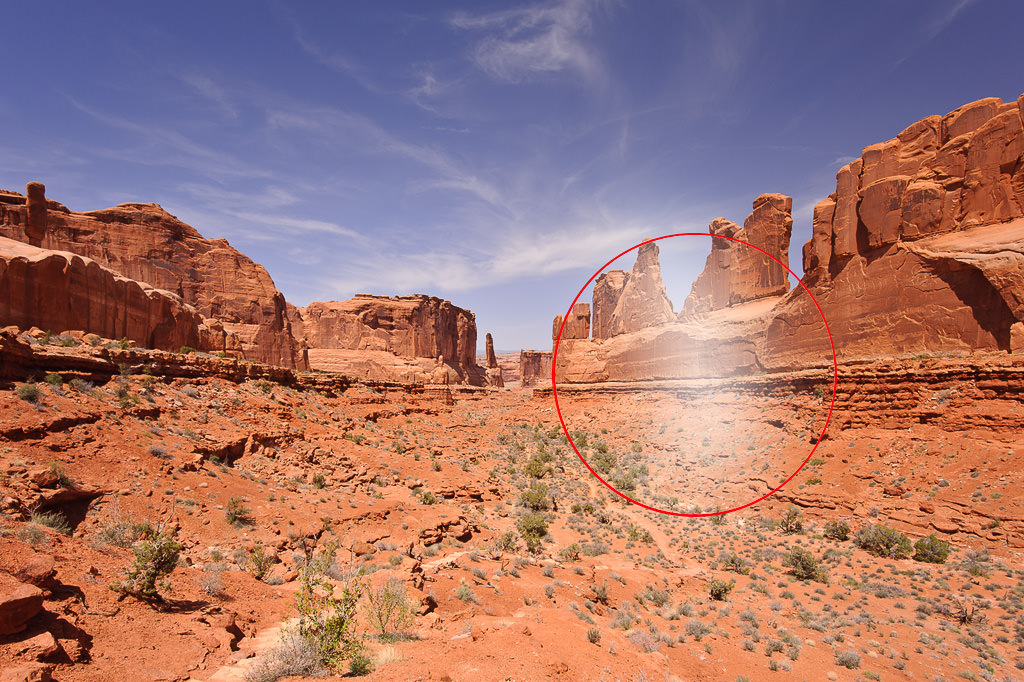
Note the white area inside the circle – that’s how oil/grease would affect the image. In many cases, you might see a color shift in addition to decreased contrast.
What about dust on the rear element? Take a look at the following image:
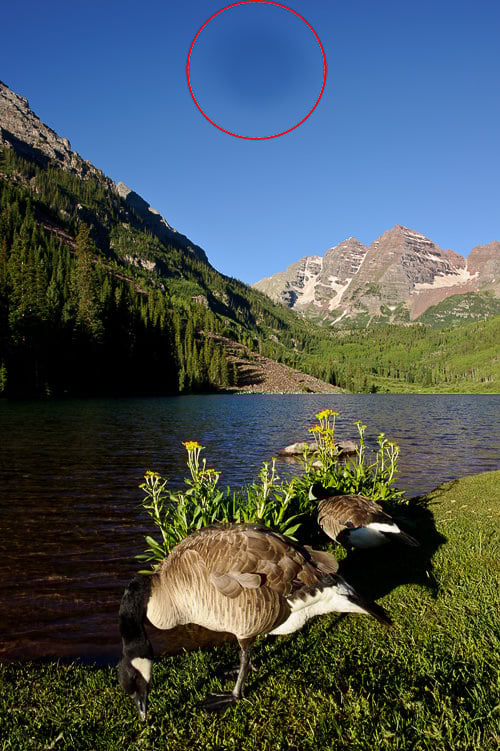
See that large dark spot on the top of the frame? When I took the shot and looked at the viewfinder, I immediately knew that the rear element of the lens had a large dust spec on it, because neither the dust on the front of the lens, nor on the camera sensor looks anything like the above. I changed lenses in a very dusty and windy area (not a good thing to do) and something large ended up landing on the rear lens element before I mounted it on the camera. The result is a large dark circle in the frame!
Dust on the camera sensor
What about dust on the camera sensor? Dust on the camera sensor can be quickly identified from the following:
- The size and visibility of the dust particles will change as you change lens aperture. At maximum apertures on fast lenses such as Nikon 50mm f/1.4G, you might not even notice the dust particles in your images, which does not mean that they are not there. They will only be visible at smaller apertures such as f/4.0-f/5.6 and higher. As you increase aperture to a larger number, the dust will appear darker and more pronounced and the size of it will also get a little smaller.
- Dust particles will always appear in the same spots.
- Sensor dust can never be seen through the viewfinder, it only shows up in images. Even then, you might need to zoom in to 100% to see it. Larger dust particles and hair can be visible right away without having to zoom in (see example image below).
Here is an example of sensor dust:
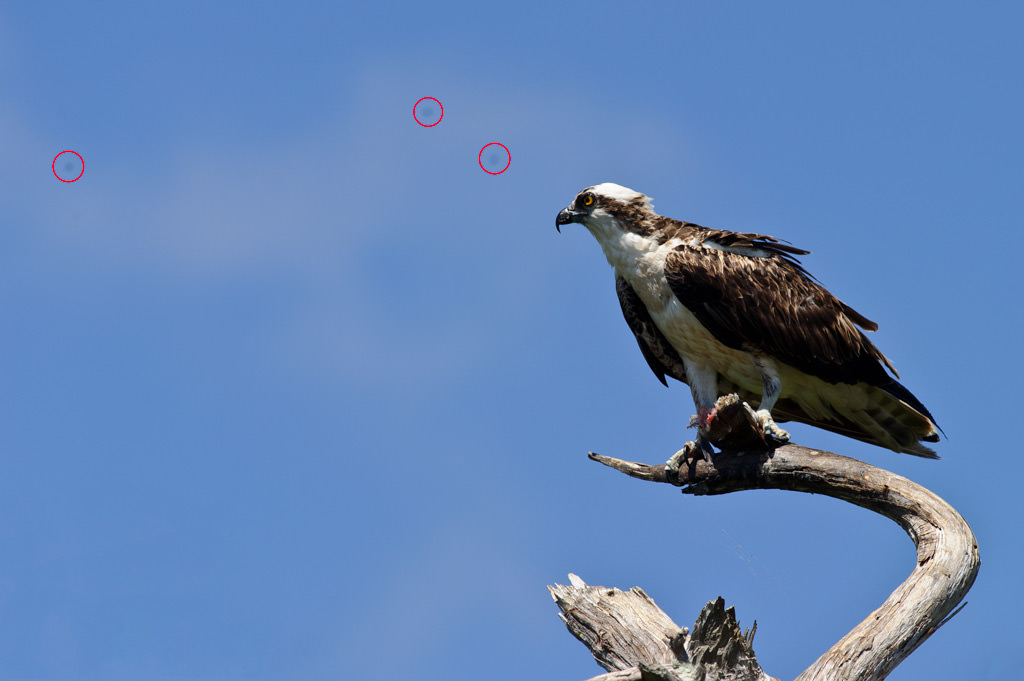
Those three sensor dust specks ended up being on my sensor after a long day of driving through a very dusty area. As you can see, the dots are quite obvious and are much smaller than the earlier example of dust on the rear lens element. I used a small aperture of f/10 for this shot to get the bird in perfect focus, so the dust specks showed up right away.
How to see sensor dust
If your camera has dust on its sensor, you can quickly spot it by doing the following:
- Set your camera on Aperture Priority Mode.
- Set your metering mode to Matrix/Evaluative Metering.
- Set your camera ISO to the lowest number such as ISO 100 or 200.
- Turn off Auto ISO.
- Turn off autofocus and set your lens on manual focus.
- Set your aperture to the largest number available for your lens by rotating the camera dial. For example, the minimum aperture on the Nikon 50mm f/1.4G is f/16, so if I were shooting with this lens, I would set my aperture to f/16.
- If you are outside, point your camera up at the clear blue sky and take a picture. If you are indoors, find plain white paper, zoom in all the way so that the paper fits the whole frame, then make sure that the lens is completely out of focus and take a picture. If you are in front of a computer, open up a text editor such as Notepad, maximize it to the screen and then get as close to the monitor as possible so that only the white color is visible in the frame. Make sure that your focus is way off (completely out of focus) – that way only dust particles will be visible.
- Zoom in on the image (rear camera LCD), scroll from left to right and top to bottom all over the image and see if you can find any dark spots.
- If you cannot see any, your sensor is clean. If you see dark spots like in the above example, then your sensor has dust on it.
Here is a shot of the sky that I took at f/16 after seeing dust in my image:
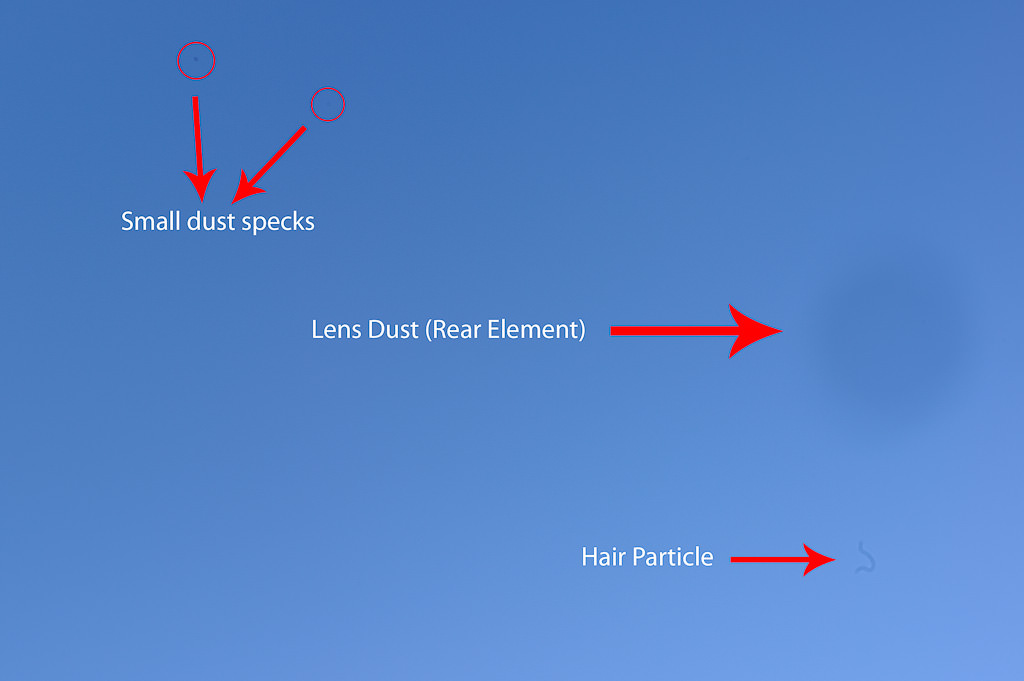
The large dark circle is dust on the rear element of the lens, while the dots and hair are both on the camera sensor. As you can probably tell, I had to do some cleaning of the sensor after I saw the above. I obviously did not do it on location, but in a dust-free environment as soon as I got back home.

Thankyou for the very helpful tutorial!! I was frustrated, but this helped me identify and clean dust off my camera’s imager.
Thanks a TON!!
I made a choice on used Canon 6D and going to test it carefully. After short researches I found your articles and will be very useful. Thanks and I’ll be following !
When the dust spec is in the top right corner on the photo, which corner of the matrix is that when looking straight at it?
Just want to know where to focus my little blower.
Tnx for you useful advice and demonstrating the gel lens cleaner. I tried what you suggested to take a test shot of my sensor at f/36 in both my bodies using different lenses. My Canon 7DMII (which I had for a couple of years doesn’t have a single spot) which made me proud but I do not use it very often and usually stays with one lens attached (the 100-400 II) most of the time and my 6D which I had for 4 years and when I use I change lenses all the time only had a couple of tiny spots which I’m also very happy about (I thought it would be far worst) and under normal shooting I never noticed them. When I visually inspect my 6D sensor, even with a magnifying glass and a head lamp I cannot identify these two tiny spots on my sensor. My question when I look at the photo with the spots at the LCD back of my camera the spots appear to be on the left hand side towards the edge and half way through in terms of height. When I visually inspect my sensor at the front should I expect to find these spots at the same coordinates or is the sensor their reverse or upside down or something along these lines. So for example what I see in the picture at the back as left when I look at the sensor at the front is right or left? Ditto for up down.
Hi
I have an iPhone 5 that had a broken screen which allowed dust to get inside. And this caused the front camera to become foggy. So I replaced the screen which includes a new selfie camera but then noticed a dust speck on the main camera images that enlarges with zoom. I tried to clean the lens with an air can and it seems to me that I’ve made it slightly bigger. After reading your article I pointed the camera right next to a white wall, out of focus, and the speck is still there in focus. I’m pretty sure that this dust was not there before my interventions. I could replace the camera (only 12€) but it’s a 1 hour job by disassembling just about the entire phone. If I blew dust onto the sensor can I remove it by blowing more air ?
I am getting a particular part as distorted. does this need repair or I can fix it at my own?
Hi there is it possible i can have permission to use these images to make a video on youtube ?
GREAT article with helpful examples.
Oops, looks like the Beaver hut is gone at Maroon Bells.
Thank you for great information