So you got yourself a brand new DSLR and after using it for a little while got the dreaded “Err” error on your camera LCD? Fear not, your camera might not damaged and there might be no need to return it back to Nikon, as they suggest in most camera manuals.
The reason why this error comes up, is because your camera is not properly communicating with your lens due to some dirt and grease both on camera and lens contacts. The solution is pretty simple – all you have to do is dismount your lens and clean the lens contacts, then clean camera contacts and mount the lens back on the camera and see what happens. Sounds too complicated? Are you afraid to damage your camera and/or lens? Then keep reading, because I will show you exactly what needs to be done.
So here is the step-by-step process:
- Dismount camera lens – before you remove the lens, make sure that you are doing this in a clean environment indoors. I prefer to do it at night (when kids are sleeping) in the bathroom :) If you have not dismounted a lens from your camera yet, now is the time to learn. Turn off your camera. Press the lens release button located to the left of the lens when the camera is viewed from the top, then rotate the lens clock-wise to dismount the lens as shown here. Right after the lens is dismounted, put the black plastic camera cap back on the camera lens mount to prevent dust from getting into the camera.
- Clean lens contacts – there are many different cleaning solutions out there, but I would recommend the following approach: first, wash your hands with soap and dry them out. Next, put some denatured alcohol (ethanol) on dry, light-colored microfiber cloth, wrap it around your index finger and gently wipe each lens contact in circular motion without touching the glass on the back of the lens. Here is how the contacts look like on the Nikon 50mm f/1.4G lens:
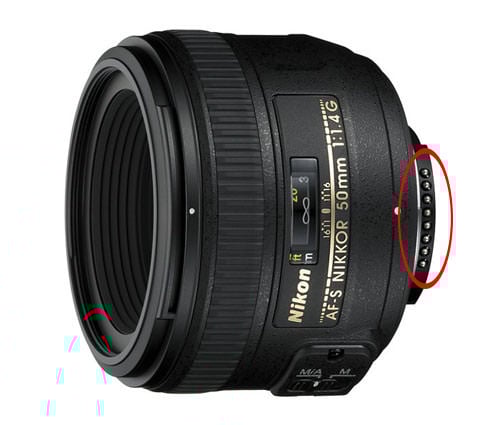
If you can see dirt or grease on the microfiber cloth, repeat the above process again using the cleaner part of the cloth. Once you are done cleaning the contacts, use the Giottos Rocket Blower to blow away any particles your microfiber cloth could have left on the lens.
- Clean camera contacts – remove the black cap from the camera lens mount, then use the clean portion of the same microfiber cloth and gently wipe the camera contacts, just like you did with the lens contacts. Here is how the contacts on the camera look like:
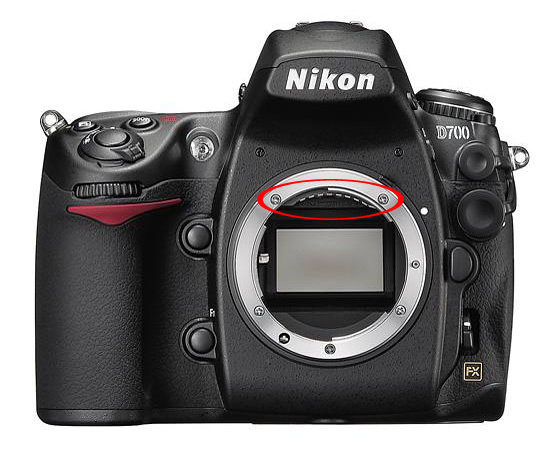
Hold your index finger with your nails facing down and while holding the microfiber cloth, move from left to right and vice-versa several times. Repeat the process one more time with the cleaner part of the cloth to make sure that there is no dirt/grease left on the camera contacts. Make sure to do this rather quickly to prevent dust from entering the camera chamber.
- Mount lens back on the camera – once all contacts are clean, align the dot on the camera with the dot on the lens and fully mount the lens in counter-clockwise direction.
- Test and make sure that the “Err” message is gone – now turn the camera on and take a few pictures. The “Err” message on the camera should be gone!
What if you are still getting the “Err” message? Try another lens and see what happens. If nothing changes, your camera could be damaged, so call Nikon for support.

I can’t thank you enough for the help. I almost lost hope as my screen and camera stopped working, with several error messages and blank screen. I tried your suggested steps, and it worked. I got my camera back. Thank you, a ton, for saving my money. And most importantly for restoring my mental peace. Love from India…
How to Fix Blinking “Err” Error on Nikon DSLR Cameras. My experience with the Nikon D750 is as follows. In my case it was a software bug. The mirror went up and stuck at the first press, when I pressed the trigger a second time, the mirror went down, at that moment the shutter did not respond, the photo was black. I tried all the options described in the article and comments, it did not help.
The solution to the problem is simple.
We go to the menu, select the matrix cleaning item and take the steps as described in the instructions to raise the mirror together with the shutter. The shutter comes alive. We turn off the power, turn it on and continue to enjoy the work of our camera.
Hi , did this happen on the very first photo taken with your D750 and was it brand new ?
I have the Nikon D90 with two kit lens for a few years but suddenly it started to refuse the lens. I mean as soon as one of these two lens is attached, fully pressing the shutter has no effect, no picture is captured. I reset the camera, cleaned the contacts, tested with another memory card, tested with another battery but with no success. I can’t test other lens because I have only kit lens 18-55mm and 55-200mm. Err is showing on top lcd. Without a lens attached, the camera can take and save pictures to the memory card (in M mode), live view is working, everything is working just fine but as soon as any of the kit lens is attached, the camera refuses to capture anything. Any suggestions?
I had the same problem and researched it on the Internet. I tried everything and it did not work. It seem to me from what I read that the problem was with the shutter. I decided to hold down the shutter button while I powered on the Nikon D850 and the shutter fired. The error message disappeared and the D850 now worked as it should. The problem was over. I concluded that electricity to the shutter allowed it to fire before the Nikon computer system was fully booted. This may be simplistic but it did work. Good luck to you guys. Hope this helps.
Walter!!! You just saved my bacon! I was in the middle of a landscape shoot and my D850 quit with the flashing ERR. Every site (including this one) I went to told me to clean the lens contacts. No help! I was panic stricken till I read your comment. Your suggestion worked!! Thank you so very much my friend!!!
This worked for me as well! I had to push the shutter button a second time after I powered up.
I also tried cleaning the contacts like everyone online suggested…no dice, then I came across your comment. Same issue here, just a stuck shutter. Thanks a bunch!!
This worked for my D100. What a treat to have it back. Thank you.
Thank you Walter. Exactly what I needed to do!
This worked for me as well on the D780. Thanks!
Did cleaning and still getting err message
my nikon d 500 shows ERR when i use a greater f-stop. when im using my 50mm lens i can only use f 1.8 any thing different i get an err message
After I take a photo a screen comes on the LCD that reads camera, metering, shutter, aperture, exposure mode, and focal length. The last photo was not displayed. The scene stayed there until I turned off the camera. the tp LCD message was 2F 1.0.
Hi there I bought a Nikon D3500 last yr and I only have taken 27 pics with it.. it stopped working I have no idea why.. I charged the battery after letting it sit for months out of the camera and it looks like it may work now but I still have this flashing icon.. it looks like a pair of folded reading glasses… lol lol that’s the best way I can describe it.. I have no idea what it means nor does anyone else that I have asked.. I need to get this working my bird just had babies again and I need to capture these ones.. I got the camera for the 1st clutch she had but it wouldn’t work.. my bird will not be having any more and the grow very fast.. please can you help me.. I would send you a pic on the icon if I knew how to send it to you.. tyvm I appreciate your time and kindness.. thanks again.. Jay..😊
I had the same blinking Err problem on my D750. The error (for me) had something to do with live view and the mirror. If you get the error, change the mode from single to mirror up and press the shutter, and/or turn on the live view after changing to mirror up and pressing the shutter.. This is what i did and the error went away
That was it! Thanks.
I had the same ERR code on my Nikon D810 and tried a lot of the solutions listed above without success. I finally remembered that I was last shooting video and had Live View (LV) activated. My first clue was when taking the lens off to clean the contacts, the mirror wasn’t visible. Typically when you turn the camera off, Live View deactivates, but in this case it hadn’t happened. Here are the things I tried:
I pressed the Qual button and the Exposure Compensation (+/-) button simultaneously (to reset the cam) without success.
I switched the camera back to photo mode (swiveled the ring from the video cam icon to the still cam icon).
I pressed the LV button without success.
I pressed the shutter release button without success.
I turned the camera off and on repeatedly without success.
I removed the lens without success.
I cleaned the contacts on the lens and the camera body without success.
I installed another lens without success.
I removed the battery and left it out for several hours without success.
I changed batteries without success.
I took the lens out of M/A mode without success.
I can’t tell you what changed, but at some point I pressed the shutter button halfway and the mirror came back down and everything was fine. As ridiculous as this seems and after using up much of a morning fiddling with it, the camera is back to normal. Hope this helps someone!
Many thanks for your experience. I tried many things before (clean lens etc), not success, but when I randomly press the button as you mentioned, finally when I press the shutter, it works and clear the err.
Thank you!!! This was my issue too. What happened was I had an HDMI cable connected and was using my D7750 as a webcam for Zoom meetings. I was messing with the camera angle on the tripod and nudged the HDMI cable while the camera was in movie live view…this kicked the camera live view off, but left the mirror up. Simply pressing the shutter release dropped it back down and then got rid of the Err message.
Many thanks Kevin!
Exactly the same for my D750, only missed a small step to throw it against a wall. Half button, at the end of so many things, like new now.