Your camera’s shutter count or number of shutter actuations is the number of times your shutter has been used to take a picture. On mirrorless cameras, this number is usually just given for the mechanical shutter.
You may be interested in the total shutter count for the purpose of selling your camera. Or, maybe you want to see how close you are to the manufacturers’ rated shutter life, which is often in the hundreds of thousands. In this article, I will explain how to find out your shutter count for most types of cameras.
Table of Contents
Why Should You Check Your Shutter Count?
Mechanical shutters have a finite life and eventually break down. With most higher-end cameras, the shutter can last for hundreds of thousands of shots, and there are a few cameras that have even reached a million actuations without failing.

Thus, checking your shutter count can tell you on average how much life is left in your shutter, which is especially useful for selling your camera. But this applies to the mechanical shutter. If you use a mirrorless camera and have it on electronic shutter mode, then there is no mechanical part wearing down, and the shutter count is not as important.
A few cameras like the Nikon Z9 don’t even have a mechanical shutter. Nonetheless, you may still be interested in finding out the shutter count, which is a proxy for how much the camera has been used.
Tools for Shutter Count
Programs to Read EXIF Data
Nikon, Sony, Fuji, and Pentax cameras put the shutter count in file metadata known as EXIF. If you do not know what EXIF is and what it is used for, check out my “What is EXIF” article. Basically, your camera writes all exposure-related information such as date, time, shutter speed, aperture, ISO and a bunch of other important information into the header of each file.
If you use a Panasonic or Olympus camera, you will need to use the methods described later in the article to find your shutter count. If you use a Canon camera, you may need to travel to another dimension.
So if you do shoot Nikon, Sony, Fuji, or Pentax, a good way to find the shutter count is an EXIF reader. The most powerful one is Phil Harvey’s ExifTool. Although it is a command-line utility, it is very easy to use. Some other programs also display partial EXIF information, and when the shutter count information can be retrieved this way, it is indicated in the camera-specific sections below.
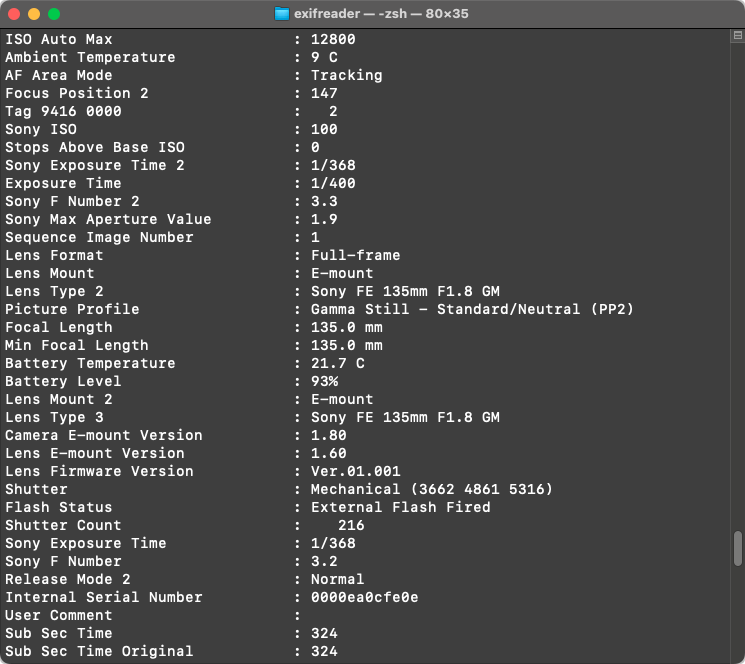
A cross-platform graphical frontend for ExifTool called jExifToolGUI also exists.
Uploading to a Website
Another option for Nikon, Sony, Fuji, or Pentax cameras is an online shutter count tool like Camera Shutter Count that simply reads the shutter count data from the EXIF information embedded in a Raw or JPEG file. This is the easiest method because it does not require downloading any program or using the command line.
If you do use a JPEG file, make sure you use one that is straight out of your camera, because output JPEGs from Lightroom or some other Raw editor may have some EXIF information removed.
Since these methods require the shutter count to be written to an EXIF field, Canon, Olympus, and Panasonic cameras will not work.
Shutter Count For Each Camera Brand
Nikon
Nikon is one of the easiest brands to check shutter count because Nikon cameras embed their shutter count data into EXIF fields. Aside from the online method I just mentioned, you can simply search for the “Shutter Count” field in your EXIF viewer, or use the following command in ExifTool:
exiftool NikonFile.NEF | grep -i Shutter.Count
With Nikon mirrorless cameras, you may get two results: the shutter count and the mechanical shutter count, the latter only counting shots taken with the mechanical shutter.
For MacOS users, the native preview app also displays the shutter count for Nikon cameras, including the latest Nikon Z9. To display it, open any Raw or JPEG with Preview. If the inspector is not open, go to Tools > Show Inspector. Once you have done this, click on the “Nikon” tab and the shutter count will be displayed:
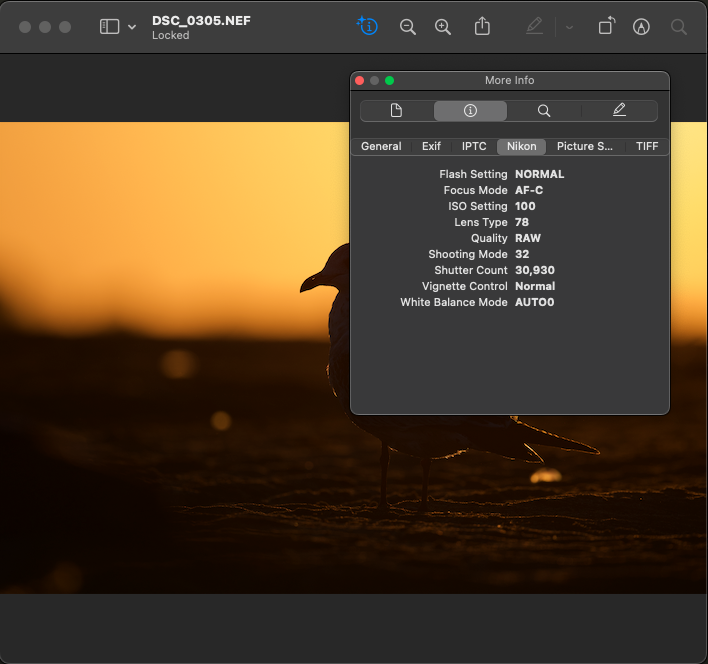
Although Sony, Pentax, and Fuji also have their shutter counts in the EXIF data, it is unfortunately not displayed in the Preview app.
Pentax
Pentax is very similar to Nikon in that the shutter count is displayed in the “Shutter Count” field in the EXIF info. If you are using ExifTool, you can use the same command that works for Nikon cameras:
exiftool PentaxFile.DNG | grep -i Shutter.Count
Sony
Sony also writes the number of mechanical shutter actuations to the “Shutter Count” field, which can be obtained with the following command:
exiftool SonyFile.ARW | grep -i Shutter.Count
There may be more than one “Shutter Count” field like “Shutter Count 2”, but the numbers in these fields should be the same.
An interesting alternative for Sony cameras is SONY Alpha shutter counter. I like this website because it does not upload your image to any server. Instead, it uses a script in the browser to extract the number of shutter actuations from your Sony Alpha camera. Not only is this a bit more secure than other websites, it also is much faster, especially if you are uploading a Raw file.
Fuji
Fuji follows Nikon, Pentax, and Sony by putting the shutter count in the EXIF metadata, except Fuji cameras use the field “Image Count” instead of “Shutter Count”. With ExifTool:
exiftool FujiFile.RAF | grep Image.Count
Canon
It is much more difficult to find the shutter count of a Canon camera. Most Canon cameras do not embed shutter count information into the EXIF data. Instead, it’s recorded only in the camera, and Canon has never released any information on how it is read.
Instead, some third parties like ShutterCheck have reversed-engineered Canon’s protocols, and their programs can display your camera’s shutter count while your camera is connected to your computer.
Newer Canon mirrorless cameras only give shutter count readings in increments of a thousand. Be sure to check if your model is supported before purchasing such an app.
Olympus
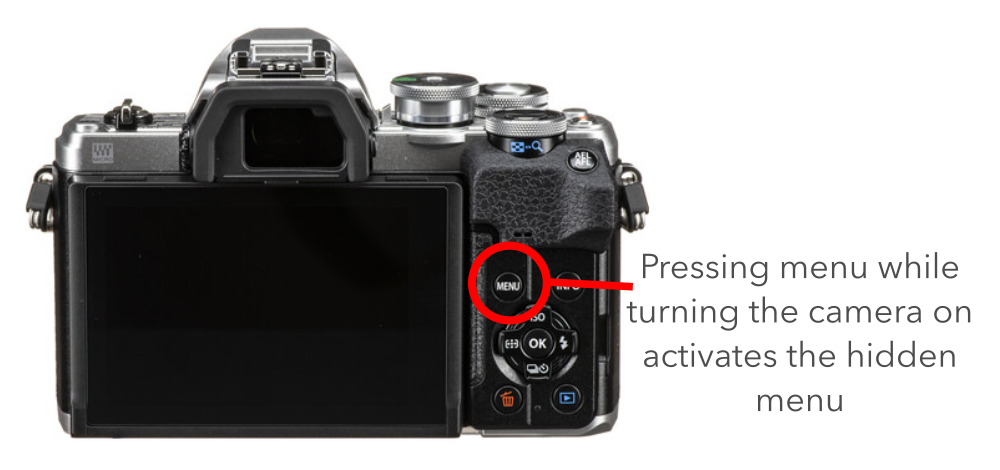
Olympus cameras have a hidden menu that displays the shutter count. Here is how you can access the hidden menu on Olympus cameras:
- Turn off your camera
- Press and hold the menu button and turn on the camera
- Stop pressing the menu button and then press it again
- Go into the wrench (setup menu)
- Go to the option to adjust the brightness and temperature of the rear display
- Press this sequence of buttons: right, info, OK
- Press this sequence: up, down, left, right, shutter, up (this will show the secret menu)
- Press right to show the second page of the secret menu.
The mechanical shutter count will now be displayed as the number after “MS”.
Panasonic
Panasonic is like Olympus in that you need to access a hidden menu to view the shutter count. To access it, you need to put your camera into maintenance mode.
Before you follow this procedure, please note that some users with VLOG installed have reported problems. Thus, if you have VLOG, it may be better to stop worrying about your shutter count.
Make sure there is a memory card in the camera and do the following:
- Select single shooting mode
- Turn the mode dial to aperture priority or some other photo mode, not video
- Turn the camera on and take a picture
- Turn the camera off
- Press and hold the play button and the AE/AF lock button
- Turn the camera on
- Press menu and select the wrench icon
- Go to Page 5 of the menu
- Go to ERR CODE DISP
- Press the menu key twice
The shutter count of the camera will now be displayed under the SHTCNT field.
Conclusion
Hopefully, you were able to determine your shutter count, especially if you shoot with a DSLR. Mirrorless cameras offer electronic shutter mode for silent shooting, and so for most people, the mechanical shutter on your camera will last even longer. Do you worry about the life of your shutter? Let me know in the comments about your harrowing experiences with determining your shutter count.

I have an Olympic E-600 camera and the directions here for locating the amount of shutter clicks, does not work on this model.
Hi Nasim,
your recommended procedure to find the shutter count on Panasonic GH 5 doesn’t work as list.
For a Panasonic GH 5, firmware 2.8 the steps must be as follows:
1. Card must be in slot 1
2. Select single shooting mode
3. Turn the mode dial to aperture priority or some other photo mode, not video
4. Turn the camera on and take a picture
5. Turn the camera off
6. Press and hold the play button and the AE/AF lock button
7. Turn the camera on while pressing the Play & AE/AF lock button
8. Keep pressing Play & AE/AF lock button plus press menu and simultaneously press the navigation wheel left twice.
The shutter count of the camera will now be displayed under the SHTCNT field.
Why isn’t shutter count/release information available in camera ? I take a lot of pictures and life expectancy is very important. Some people may even use this in making a choice as to which camera to buy. Thanks,Butch
Hi Nasim,
In respect of the exif data software, I found that Irfanview also shows the number of photos taken. If one goes to the EXIF menu under information , one is able to get the info from there.
I have tested my D750 and D7100 by this method and compared it with the online resources you have mentioned. It is 100% accurate.
Irfanview can be downloaded here: www.irfanview.com/main_…d_engl.htm
Thank you for providing us with such fantastic info and advice! :)
Dear Nasim,
I have been following your publication for last 5 years, and my compliments to you for your effort.
I am an avid armature photographer by hobby and engineer by profession retired after 51 years of service.
Although many such resources are available in the net ,personally I find yours is strikingly expressive.
Best wishes
Jayanta
I have done a bit more research and later Canon Cameras such as the 70D appear to use a slightly different version – they seem to allow more files in each folder below DCIM. It looks as though 9999 files are allowed in a sub-folder. Thus the numbers are something like 1017890 which split as above gives 101-7890. Conversion to shutter is easier as all one has to do is drop the leading 1 i.e. subtract 1 million so the above number gives 17890 shutter operations. Some Canon cameras such as the Canon Ixus seem to use the older method. The best way of determining is to see how many directories are under DCIM and what the numbers are if there are several folders and the numbers are relatively high the old format is used
The assertion above that ‘image Number’ on a Canon camera shows the shutter count is only partially correct. On my 10D it shows 2929222 approaching 3 million shots which is clearly wrong. One EXIF data tool reports the number as 292-9222. That makes more sense – the last image was IMG_9222.JPG. I then realised that the first 3 digits are in fact the folder number on the memory card. Under DCIM there are two folders at present 291CANON and 292CANON. The folders each hold 100 files so the first 3 digits increment once every 100 images to reflect the new folder number while the last 4 digits increase to 9999 then rollover to 0. A twist is that looking at one of the early images I took with this camera is that the folder numbers start at 100 rather than 0. Thus to convert the image number to the number of shots taken we need to do do the following. Split the image number into two parts the last 4 digits call this file number and the first three folder number. We then need to do a bit of arithmetic.
Shutter Count = (folder number-100)*100 + modulo100 file number
Modulo 100 of the file number may sound frightening but in reality it means just take the two right hand digits.
So for my 10D
Shutter Count = (292-100)*100 +22 = 19200 +22 = 19222 shutter operations
I have not checked this yet on later types of Canon Cameras but I expect it is the same as the image and folder numbering is set by a standard.
John
If you upload your photos to an iOS device you can download “EXIF Viewer LITE by Fluntro” for free on the Apple App Store. Then you go to your photo album and select an uploaded photo. Scroll towards the bottom of the screen and it will tell you “shutter count”. Couldn’t be any easier!
If you use the free downloaded Google’s Picasa, you can simply open the file in Picasa, right click on the file properties. Near the bottom of the properties you can see the shutter count. Very simple.
Just tried on D750. There is no shutter count entry listed in OPanda iexif2 when using it. Photoshop CC has changed the way they display file info now as well.
try t this tool, it is mine, i have release tow versions for Windows and Mac os. it works for Nikon, and also for somme Sony and Pentax cameras.
sourceforge.net/proje…exif-info/
It’s nice if you can make it work with a Canon. Thanks
Hi
i had also released a version for Canon only(on windows):
sourceforge.net/proje…ital-info/
Canon don’t save the actuattion count on the EXIF data of the image, but directly on the PCB of the camera, you must conect your Canon DSLR to a PC via USB port.
Thanks